
Compose for macOS
Be 10x productive on your Mac
292 followers
Be 10x productive on your Mac
292 followers
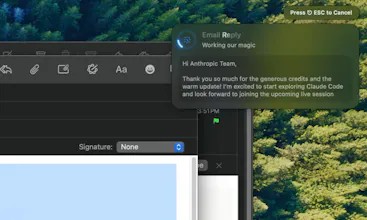
Compose enhances your writing instantly with a single keyboard shortcut. Unlike browser extensions, it works system-wide in every app. Turn basic notes into polished essays, fix emails in seconds, and never switch between apps again. Your writing, elevated.





Compose for macOS
Hey Product Hunt!
I launched Compose because I was tired of copying text into ChatGPT, waiting for responses, then pasting it back. Compose brings that power directly to where you're already writing with a simple keyboard shortcut (⌘⇧Return).
Use it to:
- Transform emails from rushed to professional
- Turn bullet points into complete essays
- Make your cover letters stand out
- Fix grammar while improving tone and clarity
- Create infinite actions and assign shortcuts (translate, convert, fix, write code anything you can do with LLMs)
Unlike Grammarly, Compose works system-wide in every Mac application.
it's already saving users hours each week.
I know you want to try it before you buy it so the first 50 requests are on me
after which it's only $4.99/month for unlimited AI requests
privacy first approach
zero log policy on all providers and our servers
no human in loop, no analytics on send requests and response
I'd love your feedback and happy to answer any questions
Osaurus
@aayushbuilds great job on the video!
How does this differ/compare with Apple's free Writing Tools?
Compose for macOS
@chrismessina
Thanks for the kind words about the video, Chris!
Great question about Apple's Writing Tools! While they do share some similar goals, Compose differs in several key ways:
System-wide vs. limited availability: Compose works in literally any text field on macOS with a single keyboard shortcut. Apple's Writing Tools require right-clicking, selecting from a menu, and are limited to specific contexts.
Compose lets you create unlimited custom transformations with dedicated shortcuts.
eg: "make this text more casual with emojis" or "re-write this to make it understandable by five year old", or "translate this to Spanish" or "calculate and give me the result" or "format this in Markdown", or "make it more polite", "make it more direct but keep it brief" I can keep going here and you can assign each to different keys so it feels instant
Better faster and more intelligent models, apple intelligence like Siri uses very "dumb" models Compose uses SOTA by default.
Personal context: You can tell Compose about yourself and your company, and it will draft emails using that information. As far as I know, Apple Intelligence can't draft emails, let alone remember your name.
You can chat with compose. Just like "ChatGPT" you can ask questions and it will answer, iirc apple intelligence doesn't even have a simple chat feature. (well Siri is just plain bad)
Think of Compose as the keyboard-driven power user's approach to text transformation - focused on speed, flexibility, and staying in your workflow.
Let me know if you have other questions!
Osaurus
@aayushbuilds cool, appreciate those differentiators!
This is a solid launch; what's on your roadmap? Any concerns about WWDC?
Compose for macOS
@chrismessina
There's tons of improvements on Quick Chat to be made.
There's a Compose Store to be launched, and sooo many requests from too many users.
I used to be excited for WWDC but after the past couple years, I've started to feel indifferent it's gotten so boring.
in the context of will they create something better than Compose? I really hope so (past couple years of WWDC has been a flop imo, so maybe there's hope)
I want what's best for me (and by extension the user) so if apple does it better, I will personally switch to using their product.
I don't really care about being the person who makes the said best thing :)
I just want to use the said best thing possible.
Is this still a time saver if we already have the ChatGPT desktop app that can be launched with a keyboard shortcut from anywhere?
Compose for macOS
@wilson_lee1
Great question, Wilson! Compose saves you significantly more time in a few key ways:
1. No context switching - With ChatGPT's app, you still need to switch windows, create a new chat, and paste your text. Compose transforms your writing directly where you're already working.
2. Instant transformation - Compose works within your current text field, so you see results immediately without copying the output back to your original app.
3. Custom actions - You can create specific transformations (make professional, simplify, expand, etc.) with dedicated shortcuts, rather than typing prompts each time.
Many of our users actually tried the ChatGPT app route first and found they saved 30-45 seconds per transformation with Compose because of the eliminated copy-paste-switch cycle.
try it out yourself and see the difference, maybe your workflow doesn't require context switching, in that case maybe not and that's okay too!
Thank you for this! I'm trying this out, and some feedback.
- Please turn off the sound when the app launching, or volume down, i felt that a bit loud.
- When to Enable Accessibility, after clicking Open Settings, there are no the compose app in the settings page. (should I add it manually?)
Anyway congrats!
Prit
This is what I really needed, @aayushbuilds!
Shortcuts must be the FASTEST way to use AI.
I also love the limitless AI request.
Good luck :)
Compose for macOS
@pritraveler
I agree, as a Mac power user Shortcuts are THE FASTEST way to interact with complex features.
That's why by default Compose maps it to a global keyboard shortcut that works anywhere.
Prit
@aayushbuilds
I customized to use as a copy writer, and as I expected, it's SUPER convenient!!
but I hope I can see some options so I can get more ideas and choose one.
Also, it'll be more convient if you suggest some shortcut options. I was little bit worried if my new shortcut may conflict with existing ones(like OS-level shortcuts), so I just deleted 'Fix writing' and reused the combination for the customized one.
Good luck!
I also loved the sound and the haptic feeback while installing :)
Compose for macOS
@pritraveler
wohoo! super glad you found it SUPER convenient, glad it helped.
I'm very much considering adding a prompt library that you can import, export and share.
OOO my fav shortcut idea is using
⌘ + ⌥ + [A-Z] or [1-9]
and you can also map
⌘ + ⌃ + [A-Z] or [1-9]
That's around 70 different actions
If that's not plenty you can do command + shift + [punctuations] too (I use . and , )
I should really make a custom keyboard button for Compose 😅
Mobilecn UI
I just gave it a try. This is really well built, love the design!
@aayushbuilds Great work!
Compose for macOS
@suman_sigdel Thanks GOAT
Tiny Mario
Love it! I share the same frustration. I built one myself too: https://smartkeys.so/ for iOs and Mac, but yours is definitely more beautiful. Good luck!
Compose for macOS
@diegodottac I love the very RizzGPT style marketing on iOS 😂 Very Gen Z very teen centric design
Tiny Mario
@aayushbuilds LOL, yeah. Stepping out of my comfort zone and trying to make some funny videos. I think the market is being the most challenging part when it comes to these products.
I was also curious why you launched this app on the Mac App Store instead of as a standalone .dmg file. I did the same and I'm not sure it was the best approach. I had to come up with some workarounds to transform text in other apps, which I'm not exactly proud of :p
Compose for macOS
@diegodottac
Why Mac App Store instead of DMG is a nice question.
TLDR;
I know
Review process is painful and frustrating
Apple takes 30% cut despite my razor thin margins
But users benefit from App Store Release, that's the only reason why.
----
Like you, I am genuinely frustrated by Apple and its review process, in fact there's an update for compose that makes Chat a much nicer experience and it's in "Review" not Reviewing not Waiting for review but in REVIEW process for the last 3 days.
I even took it out and added back in to see if it was bugged. Nope they are painfully slow
But I genuinely believe that it's much better for users when they can install and pay/manage billing through the App Store rather than through (Stripe or Gumroad).
Again, this is definitely a stupid decision, and you should try to maximize profit and also try to avoid the Apple review process (use stripe, use third party payment when you can, I am just dumb)
Again, I want to give users the best experience possible, even if that means I have to argue with Apple, get my share or profits taken, so be it. I don't care about profits as much as I care about people (or even myself)
Compose for macOS
@diegodottac
maybe my decision is stupid, but I always build for my dad, I want my dad to be able to manage/ cancel his subscription at a glance, be able to transfer purchases seamlessly across devices and not worry about which license key to add where.
You know, the goal is never to take money from my him but to empower him with great tools.
A little cut here and there does hurt me, monetarily it's bad decision maybe even as a developer it's bad, but I make products based on emotions not pure logic