Adds wide/full/tall-screen + spamblock modes to ChatGPT, enhancing your chat sessions by reducing scrolling & removing clutter. Also works on perplexity.ai + poe.com!
The widescreen layout provides a much more comfortable and immersive chat interface, allowing for better readability and ease of use , the extension integrates flawlessly with ChatGPT
Sup Product Hunters!
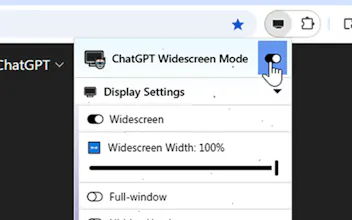
ChatGPT Widescreen Mode 🖥️ enhances your viewing experience using ChatGPT by adding Widescreen + Full-Window toggles to the native interface, all without having to login to some shady 3rd-party web app!
Responses types strongly enhanced by this feature include:
- Programming code (prevents single lines from wrapping thus obfuscating indents)
- Multi-step instructions (keeps more steps on one page for easier review)
- Long recipes
- Original lyrics/poetry/essay/composition that is more enjoyable when contained in one page
You can also enable Fuller Windows mode from the toolbar menu so with one-click, the text content is expanded to the max (no sidebar, no margins, just pure ChatGPT).
And your settings are automatically applied to any tab ChatGPT is open in (when you visit it)!
Report
@adamlui Impressive work! 😍👏 Best of luck for the big launch!
@brccl1 yes if you installed the extension, you can click jigsaw icon in toolbar > the extension's icon > Mode Notifications to toggle them off.
If you installed the userscript, you can click on userscript manager icon in toolbar > Mode Notifications under ChatGPT Widescreen Mode


chatgpt.js
chatgpt.js
chatgpt.js