burrrd.

burrrd.

Twitter Account Analytics

2 followers

burrrd. provides advanced insights and analytics for public Twitter accounts presented with a beautiful UI. ► Learn more about any user now!
burrrd. gallery image
Launch Team
OS Ninja
OS Ninja
Explore and Learn Open Source using AI
Promoted

What do you think? …

Paul
Hello Hunters, I'm very happy to be here! Thanks a lot Henk! This project was inspired by the great "Reddit User Analyser" and especially the comment section over there (https://www.producthunt.com/post...). I really enjoyed the site's overall experience and started working on a similar project for Twitter accounts. burrrd. was born. Just enter any public Twitter handle and enjoy your stay! Any kind of feedback or suggestions are greatly appreciated and maybe your idea will be the next feature I work on!
Niv Dror
@padannewitz super cool! fun playing around with it :)
Aram Shahinyan
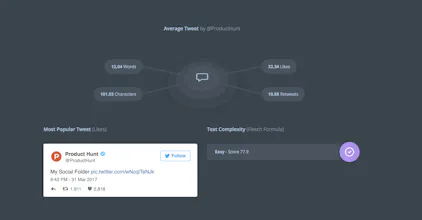
Looks really nice and neat. Yet, don't really understand what the circle part under Most Popular Tweet and Text Complexity stand for.
Paul
@aramiggs Thanks for visiting and your feedback, glad you like it! The "radar" - as I would call it - stands for connected users. It's analyzing @mentions. If I mentioned @producthunt, @dribbble and @google around 100 times in my Tweets and some other users like 40 times, ProductHunt, dribbble and Google will appear on the first circle. People I mentioned less often will appear on the second circle and so on. I hope you get the point!
Aram Shahinyan
@padannewitz @mentions @producthunt @dribbble @google got it, thanks a lot for the explanation. I think you should have the same description on the website as well.
Paul
@aramiggs You're absolutely right, I just added a heading, thanks!
Aram Shahinyan
@padannewitz great job! hope it makes everything more clear :)
Camélia Viallet
Nice UI & cool insights! It would be great to be able to perform another search directly from the results page so as not to have to go back to the home page every time. :)
Paul
@itscamelia Thanks, can't describe how proud I am reading all the feedback! Very good suggestion, will be implemented in the near future!
Paul
@itscamelia It's done! Now you can scan the next user directly on the analysis page and follow over people, who analyzed over 15 users in a row! :D I also added a share button, because I've seen a lot of people actually posting the URL on Twitter. Let me know if this fits your suggestion!
Camélia Viallet
@padannewitz Ah ! So efficient. Amazing, thank you!! The Twitter share is also a great add ;)
Mat Flamant
Beautiful single page design. Excluding non-meaningful words (such as "in", "the", "for", "on", "of", "and", "a" etc.) from the "Top 20 Words" would give more insightful results.
Paul
@mathieuflamant Thanks for your feedback! I guess you were just looking on the screenshots above, right? Basic stop words from 50 languages are already being filtered on the website. More information in my other comment (https://www.producthunt.com/post...).
Mat Flamant
@padannewitz Actually, I did a test with my Twitter account on Friday and got those words in the Top 20. It is all good now. 👍
Jeffrey Gomez
This reminds me a little of Vizify (bought out by Yahoo). Been waiting for something similar to appear.
Jevin Sew
Love the design! Any chance of adding more stats?
Paul
@jevinsew Thanks! Well, I'm continuously working on the site and I'm also monitoring the pages statistics, logs and everything else. I didn't mean to finish it and that's it. As you might have read on Twitter and in the comment section right here, some improvements you can actually see: - Removed basic stop words from showing up in the "Top 20 Words" section for 50 languages - Added share and scan buttons to the analysis page itself (most users don't just scan one user, some scan a bunch of users, they don't have to return to the homepage anymore) - Added a creative error page - ... And some very important changes have been made in the background, like reacting to changes in the API, which just returned truncated Tweets and more. All of this happened in a very small amount of time. Changes like the stop words will be announced on the burrrd. Twitter account usually. If you have any idea what stats could be generated with the user's Tweets or other data the Twitter API provides (with an acceptable rate-limit), let me know and I will see what I can do! I hope this insight was somewhat interesting!
Jevin Sew
@padannewitz And that's the right way of looking at it! The real work is after the launch. As for ideas, I was thinking of "Most retweeted tweet" and maybe some more information about followers/followings. Like "5 most popular followers" etc.
Bu Kinoshita
That's pretty cool! Easy to use, nice UI and simple! Nice
12
Next
Last