Launched this week

Backbeat Forge
Turn drum audio into a score you can actually edit
103 followers
Turn drum audio into a score you can actually edit
103 followers
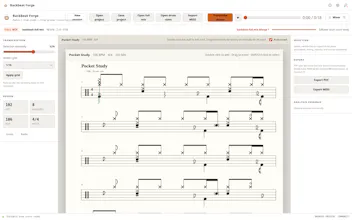
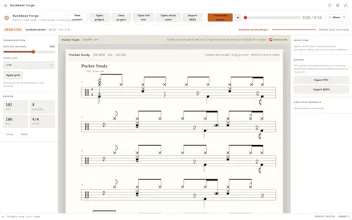
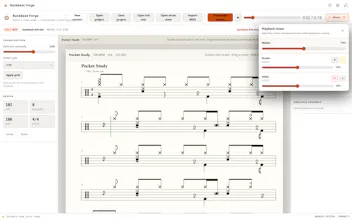
Drop in a full mix or an isolated drum stem. Backbeat Forge puts the performance on a five-line drum score you can check against playback and correct by hand. When the chart feels right, export it as a printable PDF or General MIDI file. It all runs locally.


as someone who's tried a few "audio to sheet music" tools before, drums specifically are the part everyone gets wrong because hi-hat vs ride vs crash bleed into each other in a busy mix. does it do okay on a fast double-kick section or does that turn into a mess you end up hand-correcting the whole bar anyway?
Backbeat Forge
@galdayan Fast double-kick is definitely one of the harder cases. On a reasonably clean drum stem it usually gives you a useful starting pattern, but in a dense or heavily compressed mix you may still need to correct some closely spaced kick hits by hand. Cymbal bleed can also cause occasional hi-hat, ride, or crash misclassification.
The goal right now is not “perfect transcription with zero edits,” but getting close enough that you are fixing a few notes instead of rebuilding the whole bar from scratch. I’m continuing to test and improve it specifically on faster and messier sections.
the drum score preview alongside the playback is such a thoughtful touch, makes checking hits actually feel doable instead of guessing. and running it all locally is exactly the right call for this kind of tool.
Backbeat Forge
@hava3cfd Thanks, Hava! I really wanted the score and playback to work together, since hearing a hit and immediately seeing where it landed makes correction much less frustrating. Keeping everything local was also a core decision from the start.
Dropped in a rough drum stem and it picked up the ghost notes on the snare way better than I expected, the editable score is genuinely handy for checking fills. Exporting as MIDI instead of just PDF is a nice touch for reworking parts later.
Backbeat Forge
@helinkavza Really glad it caught those ghost notes! They’re one of the harder parts to transcribe cleanly, so it’s great to hear the editable score helped with checking the fills. MIDI export was important to me too, since a transcription should be something you can keep working with, not just a static PDF.
Hand-correcting beats on a five-line staff feels way more natural than clicking grid cells, and the GM export is a nice touch for sending charts to a real kit. Glad it all stays local too.
Backbeat Forge
@ayakkab_c11661 Thanks! I felt the traditional five-line staff would be much more natural for drummers than forcing everything into a piano-roll grid. And yes, the GM-compatible export should make it easier to move the result into notation software, a DAW, or another drum workflow.
Dropped a drum stem in and was surprised how cleanly it lined up to the staff, fixing a few ghosts by hand took seconds. The local-only approach is a nice touch for anyone wary of uploading sessions.
Backbeat Forge
@malican69052 That’s great to hear! The goal was to make the automatic result a strong starting point, while keeping manual fixes fast when ghost notes or unusual hits need adjustment. Local-only processing also means unfinished sessions never have to leave your computer.
Local is a good fit for this job. Drum stems and rough mixes are exactly the kind of material people should not have to upload just to get a starting chart. I like that the score stays editable too - AI should remove the blank page, not trap the musician in its first guess.
Backbeat Forge
@krekeltronics That’s exactly the philosophy behind it. AI should give the musician a useful starting point, not pretend its first result is untouchable. Keeping the score editable preserves that control, and local processing means rough mixes and unfinished material never have to leave the machine. Thanks for putting it so well.
The transcription side looks solid, and running it locally is a big plus. One thing I'd love to see is a way to nudge the detected tempo before it lays out the grid, since slight drift in the source clip often throws off the whole chart and forces a lot of manual cleanup.
Backbeat Forge
@cihanatagan Thanks, Cihan. That’s a very good point. A slightly wrong tempo estimate can shift the whole grid and create far more cleanup than the transcription itself.
I’m considering adding a tempo adjustment step before the score is finalized, ideally with a way to preview the grid against the audio before committing it. That would make drifting or loosely played recordings much easier to correct globally instead of moving notes one by one.