ABBYY TextGrabber 6

Capture text in real time 🚀 action & translate 🗣

4 followers

TextGrabber quickly digitizes fragments of printed text and turns the recognized result into action: call, email, follow links, translate into 100+ languages and many more. The app captures and recognizes information even without connecting to the Internet.
ABBYY TextGrabber 6 gallery image
Launch tags:AndroidiOSiPad
Launch Team
Framer
Framer
Launch websites with enterprise needs at startup speeds.
Promoted

What do you think? …

Igor Akimov
Hi guys, We are very happy that the new TextGrabber 6 is on Product Hunt today! Thank you for hunting us, @chrismessina! Would not be an exaggeration to say that we‘ve put a whole lot of work into the app. TextGrabber 6 for iOS has received the new Real-Time Recognition technology that captures text in life video stream without the need to take a photo or crop it. Just point your smartphone camera at the text and digitize it in an instant – much faster and easier. The recognition works offline, no Internet connection needed. The number of recognized languages is the biggest for this type of recognition. What can you do with the captured text? Anything you want! Copy, edit, share, translate into 104 languages or hear it read out loud using VoiceOver. All the URLs, phone numbers, email addresses, street addresses, times and dates become clickable, so you can easily visit websites, make calls, create emails, find locations on maps or add events to the calendar straight form the app. Much easier than copying all this information by hand. In addition to that, we completely redesigned the interface of the iOS app making it more intuitive, modern and user friendly. TextGrabber for Android does not have real-time recognition capabilities yet, but will receive them later this year. “A super useful OCR and translation app”, according to TechCrunch, one of Business Insider’s “top 5 apps for people who travel a lot”, and an example of “black magic” according to Phone Arena, TextGrabber was created to help people easier perform their everyday tasks. It is an essential tool for travel, business and school as it quickly and accurately captures text in a foreign language and translates it into the user’s language of choice. It also serves the needs of people with low vision who will be able to hear virtually any text from print, computer or TV screen with minimum effort or delay. To celebrate the launch, we made TextGrabber free to download until June 29. Today, exclusively for the Product Hunt community, we are offering a promo code for the translation in-app purchase in TextGrabber 6 for iOS. To activate it, please follow these steps: open the app and tap [i] on the History screen; tap and hold the [About] option until you are asked to enter a promo code; enter the code ARES1. We are looking forward to your comments and questions – we will answer them all! Have a wonderful day, everyone!
Sam Cholera
@igor_akimov @chrismessina Makers? You should be called magicians! Congratulations to you all on this
Anna Koltsova
@sam_cholera, thanks for your high rating! Will print your words and show it to our developer's team!!!
Sam Cholera
@nyushechka_z My pleasure, please pass on that you are taking them all out for a meal on my behalf :D
Anna Koltsova
@sam_cholera Sounds great! Will do this for sure.
Chris Messina
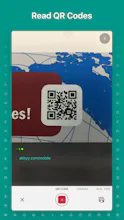
This new version of TextGrabber looks stellar now that it's doing the processing in real-time and on the device: Powered by machine learning, the app lifts text of any color from any background directly on a camera preview screen eliminating the need to take a photo. The recognition is performed on the device, no Internet connection is needed. The technology works with 61 languages, the biggest number on the market in its category. The digitized text instantly becomes actionable: it can be copied, edited, shared, translated into 104 languages or read using VoiceOver. All links, phone numbers, email addresses, street addresses and event details become clickable for the user to easily perform the corresponding task – follow, call, email, find on maps or add to the calendar. As an additional feature, TextGrabber also works as a QR code reader. All the digitized texts and QR codes are saved in the app’s History section, easily accessible for further use.
Krishna De
Great to see this here - I downloaded the update when it hit the app store on iOS. BTW is it meant to be free only on the iOS store? I see a sale for it on the Play store but it is not free at this time? Just so I know what to share with my network - thanks
Anna Koltsova
@krishnade HI, Krishna! Nice to hear that you like our app. As for TextGrabber Android - yes, we can not make it free for a number of reasons. Now on Google Play it is available at the discounted price till June 29. Please, note that it does not include real time capture yet (it will be done by the end of the year).
Michael
@krishnade Exactly, TextGrabber iOS if free until 29th, but Android version is available with -60% discount, until 29th June as well. Thanks for your comment!
Krishna De
@nyushechka_z Thanks for confirming so I can share this accurately with my contacts!
Krishna De
@mshoubin Thanks for confirming - already messaged some people to recommend it to them!
Krishna De
@mshoubin Meant to say - a very clever execution of your Easter Egg for PH folds - first time I have seen that approach!
Dmitry Suholet
TextGrabber was a handy tool for me. Now it's even better. I'm really impressed with real-time recognition feature. And it's free for old users. I would pay for the new version if I could just to support developers :)
Anna Koltsova
@suholet , thank you very much for your wonderful words! We work hard to make it cool and useful!
Sam Cholera
@nyushechka_z @suholet I'm on Android, and the iPad is in for screen repair, if not back by June 29, any chance of extending your wonderful offer?
Michael
@sam_cholera As a possible workaround, you can get the app from iTunes on your Mac or PC. Then this free "purchase" will be tied to your Apple ID and you will be able to download it on your iPad for free, once you get it back from repair
Michael
@sam_cholera Please feel free to reach me directly if you face any issue with this workaround
Sam Cholera
@mshoubin #OnTheBall Done, saved via PC
Anatoly Sharifulin
I like it, one of my favourite app 🔥
Anna Koltsova
@sharifulin sounds great, thank you! If you already tried our real time capture, would be happy to hear your feedback!
Aram Pakhchanian
Using since first versions. This one is a huge leap forward. My normal scenario was to cut off pieces of text from paper. But with video support that's going to be much more handy.
Catherine Johnson
@aram_pakhchanian, thank you! We are very happy that you like the new version! Yes, no more cropping photos before recognition. The real-time recognition helps save time for more important things
Manuel
This could have saved me from learning all the vocabulary when I had to pass latin exams in school. Very cool update! I use this daily at university.
Anna Koltsova
@manuelauer nice to hear that our app became lifesaver for you. Stay with us!
12
Next
Last