
Supavoice
Voice to text app for macos
163 followers
Voice to text app for macos
163 followers
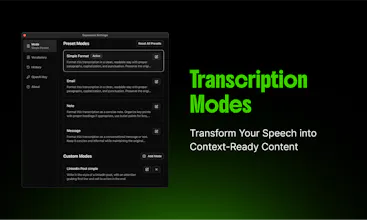
Supavoice turns speech into perfectly formatted text in any Mac app. Dictate emails, notes, and posts with smart formatting modes. One-time purchase, uses your own OpenAI API key - you control the costs. Say it, format it, done.




Hello! 👋
I'm Ajith, the creator of Supavoice. I built this tool to solve my own need for a simple voice-to-text app on Mac.
I've been personally using Supavoice daily for a week now, and it's transformed how I work:
• When I'm using Cursor or WindSurf, I dictate complex prompts instead of typing them
• For emails, I speak naturally and get a good first draft
• While chatting with Claude or ChatGPT, I can have more fluid conversations by speaking
• When inspiration strikes during a walk, I can quickly dictate notes
My favorite part is how it just works across any app. The formatting modes save me tons of editing time.
I'd love to hear how you end up using Supavoice in your workflow! What would you most like to dictate rather than type?
PS: Happy to answer any questions you might have!
I have tested this tool over the past few days, and it is truly impressive.
Kudos to Ajith for creating this!
@geon_george Thank you, Geon! Glad you like the app!! 😊
Hey @ajith_r! 👋 Been testing out a lot of voice-to-text tools lately, and I'm curious about Supavoice's secret sauce. The Mac's built-in dictation is okay, but it feels pretty limited. What makes your app stand out?
@vivekk_kumar Thank you for your question! I would say Supavoice is lightweight, works in any Mac app, has smart formatting modes (you can create custom formatting modes), and more importantly for many, you pay once to own it forever. It supports the latest 4o and 4o mini models too. We have some exiciting features planned. :-)
Really loving the experience, I'm impressed with the part where it formats my message understanding the context, as a person who thinks out loud this really helped me to put thoughts in to words better and faster
@vivek_mohan1 Thank you, Vivek! Glad you find the app useful :-)
Supavoice's macOS integration for speech-to-text conversion is a promising tool for enhancing productivity. I'm interested in how it compares to existing solutions like OpenAI's Whisper and Whisper Notes which was launched on product hunt about 10 days ago. Specifically, does Supavoice utilize Whisper's ASR technology, or does it employ a different speech recognition engine? Additionally, how does it ensure user data privacy during the transcription process?
Whisper Notes @faizanjan_ Supavoice uses OpenAI's latest 4o and 4o mini audio models (in addition to Whisper) for much better accuracy, so it needs a stable internet connection. It also has intelligent formatting with custom modes for emails, notes, and more. The main use case for Supavoice is e.g. writing emails, messages, social media posts, instructing Cursor/Windsurf/ChatGPT/Claude, and so forth.
For privacy, you use your own OpenAI API key - your audio never passes through our servers, and we have zero access to your data. Plus, it's a one-time purchase rather than a subscription.
This feels like exactly what i've been looking for.
Although - are you connected with Supabase? If not, they may want their logo back. ;-)
@steve1215 Thank you for pointing this out! I appreciate the feedback and definitely plan to evolve the branding as the product grows :-)
I've enjoyed using this tool so far. It's lightweight -- only 5 mb dmg file. And I really like paying once up front and the ability to use my own API key for processing going forward.