AI Tools For Growing on YouTube

AI Tools For Growing on YouTube

The BEST AI YouTube software to grow a channel

7 followers

Tube Magic is a suite of online tools designed to help you succeed with YouTube. Including AI titles, descriptions, tags, and scripts designed to help you get more views and subscribers.
AI Tools For Growing on YouTube gallery image
Free Options
Launch Team
AssemblyAI
AssemblyAI
Build voice AI apps with a single API
Promoted

What do you think? …

Michelle
Hunter
📌
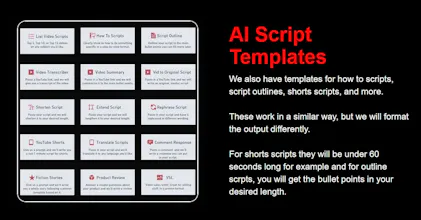
The BEST AI YouTube software to grow a channel. Tube Magic is the BEST suite of online tools designed to help you succeed with YouTube. Including AI titles, descriptions, tags, scripts, and much more designed to help you get more views and subscribers. Get more subscribers and views on YouTube using TubeMagic's suite of state-of-the-art AI tools. We will help you find the right topics, write the right scripts, and optimize your videos correctly. Use AI to Boost Your YouTube Content Creation 1. Generate Video Ideas Based on Content Simply input a keyword or a short description (e.g., "tallest buildings"), and our AI will provide optimized video title suggestions to inspire your content. For example, it might suggest a title like "The Tallest Buildings in the World That Will Shock You." 2. Generate Ideas Based on Channels Input any YouTube channel handle (whether it’s your own or another channel’s), and our AI will generate content ideas based on that channel. All generated ideas will be saved in your logs so you can revisit them anytime. 3. AI YouTube Video Script Generator Enter a prompt and choose your desired word count, and our AI will generate a fully optimized YouTube video script for you. You can also choose from various templates, such as "How-to Scripts," "Script Outlines," and "Shorts Scripts," among others. 4. General Script Writer Input your video title and any additional details you'd like included in the script. Then select the number of words you want for the script. Our AI will generate the optimized script and provide an estimated video length based on the word count. 5. AI Script Templates We offer various templates to assist you in creating scripts, including "How-to Scripts," "Script Outlines," "Shorts Scripts," and more. Each template works similarly, but the output is formatted to suit your needs. For example, "Shorts Scripts" will be under 60 seconds long, while "Outline Scripts" will provide bullet points of your desired length. These templates are designed to save you time and ensure that your content is optimized for different formats. 6. Script Outline Generator One of our best tools, this allows you to input a video title or any additional context and generate a high-level overview of your script in the form of bullet points. You can adjust the outline length using our word count slider tool. 7. How-to Script Writer Tutorial videos perform exceptionally well on YouTube, and with our AI tool, you can generate unlimited how-to scripts for your videos in seconds. Just tell us what your video will teach, and we'll give you a step-by-step script formatted in chronological order. This is perfect for educational or instructional content. 8. AI YouTube Shorts Script Generator YouTube Shorts are a great way to gain views, and our AI Shorts script generator can quickly create scripts under 60 seconds (the typical length of a YouTube short). Now, creating YouTube Shorts will be fast and efficient! 9. Script Word Count Slider For our general script writer tool and many of our script templates, you can use a slider to select the desired word count for your script. Once you generate the script, a popup will display the estimated video length based on the word count. 10. Input a Keyword for Script Generation You can input a video title or any other relevant details and select the number of words for your script. Our AI will generate an optimized script and provide an estimate of how long the video will be. These tools are designed to help YouTube creators enhance their content creation process, optimize videos, and streamline script writing. Please note that the results may vary based on factors such as content quality, audience engagement, and platform strategies. Our tools provide support and guidance, but success is dependent on various aspects of content creation.