Launching today

AudioLens for VS Code
Audio playback, waveforms & spectrograms in VS Code
1 follower
Audio playback, waveforms & spectrograms in VS Code
1 follower
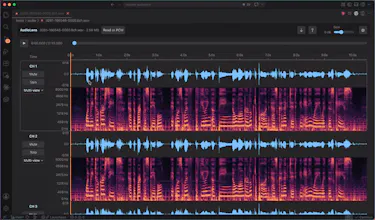
Listen to audio while inspecting per-channel waveforms and spectrograms inside VS Code. Play a selected region, mute or solo channels, and measure RMS, peak and clipping. Also supports Remote SSH workspaces, raw PCM with explicit format settings, and WAV entries inside Kaldi archives. Free, Apache-2.0, with no separate AudioLens account or hosted audio-upload service.



Launch Team

AWS Activate CreditsCredits that fuel your startup’s next milestone
Promoted
Hey guys! I'm Simon, and I made AudioLens for my own audio workflow in VS Code.
I had been using audio-preview, but I found its spectrogram and analysis controls awkward. At the time, I could only inspect one channel, which got in the way with multichannel recordings. I wanted to open a sample beside my code, listen to it, and see each channel's waveform and spectrogram on the same timeline.
AudioLens lets you do that, then select a region to hear it more closely, inspect RMS, sample peak and clipping, or export that selection as WAV. There are also explicit settings for raw PCM and support for WAV entries in Kaldi archives. It is free and open source under Apache-2.0.
The three GIFs show the extension doing these things: multichannel playback and views, selection playback and measurements, and opening a supported audio path from text. Source and documentation: https://github.com/SimZhou/vscode-audiolens