
iBoomto AI
Document assistant: chat with files, summarize & draft docs
32 followers
Document assistant: chat with files, summarize & draft docs
32 followers
iBoomto AI is a Windows app for document work. Drop in a file or paste a link to chat with it or summarize it. Built-in tools edit PDFs, extract text from images and scans, and draft documents, spreadsheets, slides, and mind maps.
This is the 2nd launch from iBoomto AI. View more

iBoomto Local Chat
Launching today
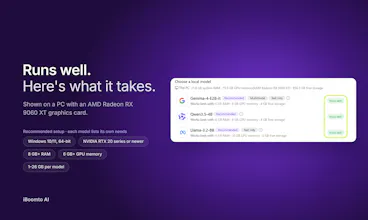
A lightweight Windows app to chat with your files locally. Pick a model, download it once, drop in a PDF, and ask away. Local Chat is free and it labels every model so you know upfront if your PC can actually run it.



Free Options
Launch Team

AWS Activate CreditsCredits that fuel your startup’s next milestone
Promoted

Hey Product Hunt, Tina here from the iBoomto team! 👋
We actually dropped iBoomto here back in September as a document AI app for Windows, running on cloud models. With this v1.1, we added Local Chat: you pick a model, download it once and it runs on your own PC. Drop in a contract or a report and ask about it. Local Chat is free.
The part we obsessively tweaked, though, was the model list. Nobody likes downloading a massive 7B file just to watch their laptop choke and sound like a jet engine. So before you hit download, each model gets a straight-up tag: Runs well, May run slowly, or Not supported for whatever specs you’re on. No blind guessing.
If you don’t feel like downloading a model today, Cloud Chat and 7 document tools are still right there to pull text out of scans, edit PDFs, or turn what you find straight into slides, a sheet, or a Word doc.
Anyway: what tag did your PC get, and did the performance actually match the label? Would love to hear!