
ClipForge AI
Finds the clips worth posting in your long videos
2 followers
Finds the clips worth posting in your long videos
2 followers
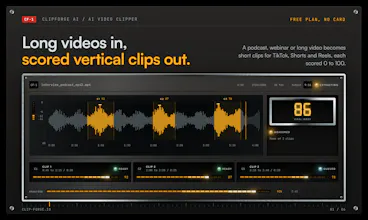
You upload a long video or podcast. ClipForge reads the whole transcript and pulls out the parts that actually work as short clips, and gives each one a score from 0 to 100 so you know which to post first. It crops them vertical for TikTok, Shorts and Reels, burns in captions, and you can trim before you export. Free plan is 3 videos a month, no card needed. Paid plans start at $19 and add 1080p, no watermark and more caption styles.
This is the 2nd launch from ClipForge AI. View more

ClipForge AI
Launching today
ClipForge AI is a web-based AI video clipper at clip-forge.io, made by Strategia-X and founded by Rocky Elsalaymeh in 2025. It turns long videos and podcasts into short vertical clips for TikTok, YouTube Shorts and Instagram Reels, and gives each clip a 0 to 100 virality score.


Free Options
Launch Team / Built With


AWS Startup AdvisorPersonalized AWS guidance that meets you where you’re already building
Promoted

Since our April launch, I've added a bunch of new features:
- Brand kits. Set your caption font and colors, your logo, and intro and outro cards once, and every export uses them. You can build and preview it on any plan; fonts and colors export from Creator, logo and cards from Pro.
- Templates. 8 ready-made ones, and you see them on your own clip before you apply them. You can apply one to a bunch of clips at once and undo it in one step.
- Bigger uploads. Up to 5 GB even on free, in pretty much any video format. It gets converted once on our end.
- A real timeline editor (Pro Studio) on every plan, including free. You can drop your own music and b-roll into a project.
- A user guide at clip-forge.io/guide with a page for every screen, plus a walkthrough for your first clip.
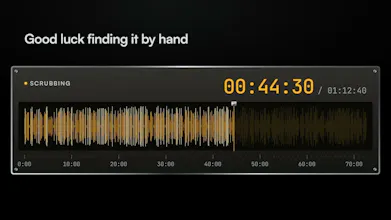
Quick backstory, for anyone new. If you've ever tried to turn a podcast or a long YouTube video into shorts, you know the drill. You've got an hour of footage, you know there's a good 40 seconds in there somewhere, and you end up scrubbing back and forth for way too long trying to find it. Then you still have to crop it vertical, add captions, and trim it. I got tired of doing that, so I built this.
How it works
1. Upload your video (MP4, MOV or WebM).
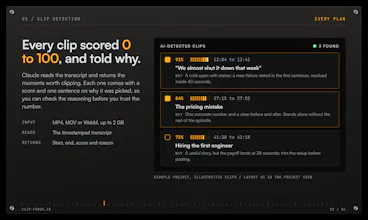
2. It gets transcribed, then Claude reads the transcript and picks out the moments that can stand on their own as a short.
3. Each clip comes back with a start and end time, a score from 0 to 100, and a short reason for why it was picked. The score is the AI's judgment, not a promise of views, but it's a pretty good way to decide what to look at first.
4. Pick the ones you like, choose the aspect ratio (9:16, 1:1 or 16:9), pick a caption style, trim if you want, and export. Captions are burned in, so they show up on every platform.
What you get on the free plan
- 3 videos a month, up to 30 minutes each, files up to 5 GB
- Clip detection with a score on every clip
- Bold Pop captions
- Vertical crop
- The timeline editor (Pro Studio) and 8 ready-made templates
- 720p export with a watermark
- No credit card
Paid plans, if you need more
- Creator, $19 a month ($15 if you pay yearly): 20 videos a month up to 2 hours each, 1080p, no watermark, all 3 caption styles (Bold Pop, Karaoke, Minimal), captions in your own font and colors, a breakdown of each score (hook, emotional peak, pacing, standalone value, trend fit), thumbnails, batch export
- Pro, $49 a month ($39 yearly): 100 videos a month up to 4 hours, the hook writer that gives you 5 different opening lines per clip, trim suggestions, Follow faces cropping, a content calendar, analytics, your logo plus intro and outro cards
- Agency, $149 a month ($119 yearly): unlimited videos, a brand kit per client, multiple workspaces, webhooks
Stuff I want to be upfront about
- The default crop is a center crop. If the speaker isn't in the middle of the frame, use Follow faces on Pro or reposition it yourself.
- It doesn't post anything for you. You download the clips and upload them wherever you want. Direct posting is planned but not live yet.
- The viral forecast on Pro is a model's estimate. I haven't measured how accurate it is, so treat it as a rough guide.
- Your videos are never used to train any AI model.
- If you have your own API key (Anthropic, OpenAI, Gemini, OpenRouter and a few others) you can plug it in for unlimited AI usage and pick your own model.
Try it without signing up
There's a demo workspace at clip-forge.io/demo, no account needed. You can click around a real project with detected clips and see how it all works.
I'd really like to hear what you think, especially if you make podcasts, YouTube videos or do this for clients. What would make it actually save you time? Anything confusing? Roast it if you want, but would seriously welcome your feedback and thoughts!