Launching today

Chief Status
The menu bar app Grok Bot should have shipped with
0 followers
The menu bar app Grok Bot should have shipped with
0 followers
The menu bar app I think should have shipped with Grok Bot: a cube showing which agents are working, done, failed or need you. Not official. Works with any bot that posts a status line to your own Cloudflare feed. Free, open source (MIT), macOS 13+.


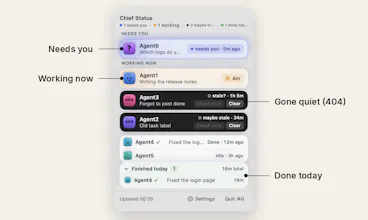


Hi all, I'm Jimmy. I've been using xAI's Grok Bot intensely, but found it was missing something...
My opinion: a menu bar app like this should have shipped with Grok Bot. If you run a team of AI agents and can't see at a glance who is working, who has finished and who is stuck, you're missing out. I got tired of opening chat after chat, so I built the thing I wanted.
To be clear, Chief Status is not made by Grok Bot, not official and not partnered with it. I just use it with my own Grok Bot agents every day. It works with any bot that can post one short status line.
What it does: a small cube in the Mac menu bar. Grey means every bot is idle, orange means one is working, red means one failed. A ? means a bot is waiting on you, and 404 means the working bots have gone quiet. Click it and the panel shows each bot's job, how long it has been running, and what finished today. Each bot gets its own colour. If you turn it on, the Mac can speak when a bot fails or needs you.
How it works: your bots send one short line ("working", "done", "failed", "needs you") to a small feed on your own free Cloudflare account. The app only reads that feed. It uses no AI itself, and it can only show what your bots tell it.
It's free and open source (MIT), a native Swift app with no account and no tracking. It talks to one place only: the feed address you give it.
Setup is about ten minutes, once: a free Cloudflare feed, then you paste one short instruction into each bot.
Honest limits:
You need a free Cloudflare account and a GitHub or GitLab account for the feed.
It's Mac only (macOS 13 or newer, Intel and Apple chip).
It's unsigned (I don't pay for an Apple developer account), so the first open needs "Open Anyway". The steps are in the README.
Unless you lock the feed with a read token, anyone who knows its address can read the bot names and task lines. Keep task lines free of private details.
I'd love feedback on:
Setup: was the feed and the bot instruction clear, or where did you get stuck?
Which statuses do you want your agents to report that it doesn't show today?
Anything about the first open that confused you?
Thanks for looking.