FrelyMCP lets browser agents and command-line agents such as Codex and Claude Code access your device's files, commands and processes through remote HTTP MCP with OAuth.
What became possible in your product with Astra that was not practical before?
Maker
The powerful Astra model provided the foundation for its implementation, while the somewhat unstable Codex service served as the inspiration for its creation.
Report
Maker
📌
When I hit Codex usage limits, ChatGPT in the browser was still available. I wanted ChatGPT Work to connect to my computer so it could help me write code, inspect projects, and debug programs through the web interface.
I started with a single MCP connection for my own machine. While building it, I found a broader problem: connecting another device, choosing a workspace, and managing permissions should take less work than setting up SSH and port forwarding. Frely CLI became a device MCP service with an outbound relay connection, workspace configuration, and OAuth approval. The same flow can connect multiple computers without exposing a public inbound port.
The authorization model evolved too. Client login and device execution permission are separate. Workspace access has a time limit and can be renewed or revoked. File tools stay within the selected workspace, while shell and process actions use the target computer’s OS permissions.
What began as a workaround for my own usage limits became a tool for remote development across devices. I’m sharing it to see whether other developers want ChatGPT, Codex, Claude Code, or another MCP client to work with the computers they already use. I’d like feedback on the setup flow, workspace boundaries, and the workflows you want to run.
Report
Maker
A practical guide to connecting your computer using the ChatGPT web


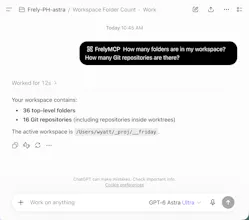
A practical guide to connecting your computer using the ChatGPT web
https://wyattcoder.top/en/posts/use-frley-mcp/