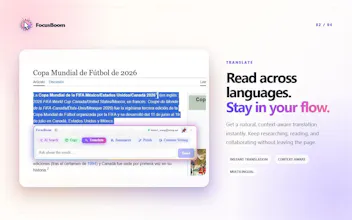
Stop tab-hopping for every little task. Select anything on a page and the right AI tool bursts open on the spot — 31 intents across text and images. Free browser extension. FocusBoom is a free AI tool that works on any page. Select text or capture a screenshot to get the right result in place—no prompt to type, no copy and paste, and no switching tabs. A draggable floating AI menu stays with your work. Move it anywhere on the page. FocusBoom understands the context and suggests the right action.
Hi Product Hunt,
Focus is the scarcest thing we have right now. There are too many videos, apps, products, and ads fighting for it — and the moment you reach for a tool to help you focus, you usually have to leave the page, switch tabs, and then spend a long time clawing your attention back to where you were. That loop is quietly exhausting.
We felt it most when we were actually trying to get things done. Reading a paper meant bouncing between DeepL and ChatGPT. Reading docs meant copying code over to an AI just to ask a question. Charts on the web got typed into Excel by hand. Every task sent us off-page, and every off-page trip cost more focus than the answer was worth.
So we built FocusBoom — an AI that lives on whatever screen you're already looking at. You select text or capture a screen area, and it figures out the intent on its own (translate, summarize, explain, look something up) without you typing a single prompt. The result shows up in place. That's the whole idea: Solve it in place, boom your next step.
What's in it today — 31 intents across text and images:
●Translate, explain, summarize, rewrite, continue — highlight and go.
●Analysts: capture a table or chart and turn it into data you can analyze and plot.
●Social & content: draft replies, summarize long threads, cut a subject out of an image.
●Developers: select code for an in-place explanation, or turn JSON into a visual table in one click.
●Quick lookups without leaving the page: calories, recipes, attractions, products, company info.
The part we're proudest of is the memory. FocusBoom doesn't start from scratch each time — it learns you. It remembers that you like bilingual output, that you reach for translate a lot, and it quietly reorders your toolbar so the action you want is the one that pops up first. Show the same English sentence to a developer and a marketer and they'll see different top actions. The longer you use it, the more it becomes a partner for working, learning, and living inside your browser.
It's a Chrome browser extension. And right now the first version is completely free: all 31 intents unlocked, 50 intent triggers a day, resetting daily.
If you spend your day reading, coding, researching, writing, or just browsing — give it a try. We'd genuinely love to hear what feels off, what's clumsy, what you'd change. Every comment and suggestion lands with us directly.
Welcome, hunters — come poke at it.