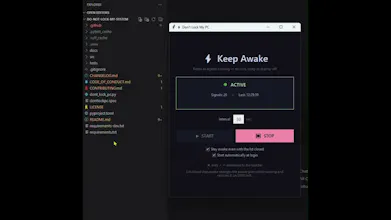
Long-running AI agents, model downloads, and automated workflows shouldn't be interrupted by corporate lock screens or sleep timers. Don't Lock My PC keeps your system awake without registry hacks, then auto-powers down when your work is finished.
Hey Product Hunt! 👋
I'm Mahantesh, creator of Don't Lock My PC.
Like many of you, I've been running more autonomous AI agents (Claude Computer Use, AutoGen, long batch evaluations) and large dataset transfers that run for hours.
The problem: You step away for lunch or head to sleep, and strict corporate or OS power policies kick in—locking the session, cutting RDP connections, or putting the machine to sleep mid-run.
Most existing solutions either require permanent registry hacks, heavy caffeinate utilities, or constant manual mouse jiggling.
⚡ Why Don't Lock My PC is different:
1. One-Click Keep Awake: Simple, non-intrusive signals keep your screen and session awake without interfering with your windows.
2. Scheduled Auto-Power: Set your agent to run for 2 hours, and configure Don't Lock My PC to automatically sleep, hibernate, or shutdown afterwards—complete with a 30-second cancelable warning dialog.
3. Lid-Closed Stay Awake: Keep running tasks even when your laptop is closed on your desk or in dock mode, safely restoring power plans on exit.
4. Flexible Formats: Use it as a native desktop app, a headless Python CLI (`pip install dontlockpc`), or directly in your browser with zero installs.
It is 100% free and open source on GitHub:
👉 https://github.com/mahanteshimat...
I’d love to hear your feedback, feature requests, and what AI workflows you're keeping awake!