
TypeFlow
AI in every app, right where you type
4 followers
AI in every app, right where you type
4 followers
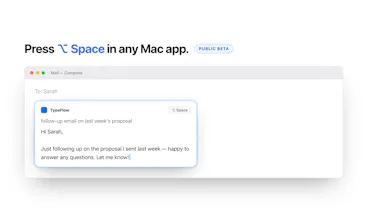
TypeFlow puts an AI command layer inside every app on your iPhone and Mac. Type or speak what you need and the draft lands in the field you're already in. On iPhone it's a keyboard: switch to it in any app and the response is typed straight into the field. On Mac, press ⌥Space and a card opens at your cursor, reading the screen for context automatically. Also included: dictation with AI cleanup, and snippets that fire from any field.




Free Options
Launch Team

Framer AI AgentsDesign and publish professional sites with AI
Promoted
Hey Product Hunt 👋
I built TypeFlow because I was Cmd+Tab-ing to ChatGPT dozens of times a day, and retyping all of my prompts. Write an email → leave the app → prompt → copy → come back → paste. Then do it again in Slack. Then again in Notes.
TypeFlow removes the round trip. It's an AI command layer that lives inside the app you're already in:
📱 On iPhone, it's a keyboard. Switch to it in any app where you type, then type or speak a prompt, and the response is teleported straight into the field.
💻 On Mac, press ⌥Space anywhere and a card opens at your cursor.
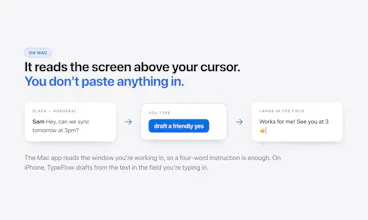
On Mac it reads the window you're working in automatically, so "reply and keep it short" already knows what you're replying to. On iPhone, iOS won't let a keyboard see outside its own text field, so there it works from what's in the field you're typing in.
Additionally, you can pass either the Mac or iOS app any context you deem relevant to your prompt.
Also in there: dictation with AI cleanup, and snippets (/fix, /shorter, /reply) that expand from any text field on either device.
A few honest notes:
• The Mac app is a public beta. It works, I use it daily, but you will find rough edges. Please tell me when you hit one.
• One subscription covers iPhone and Mac. 7-day trial.
I'm here all day and answering everything. Excited to hear what you all think :)
Matthew