WisprFree turns your voice into clean, polished text in any app. It transcribes on-device (Parakeet/Whisper/Cohere), then an AI of your choice — Gemini, OpenAI, OpenRouter, local Ollama — removes the "um"s, fixes grammar, and spells your names right. Your keys stay in your Keychain; skip the AI and it's fully offline. Free, open-source, and yours.
No reviews yetBe the first to leave a review for WisprFree
Maker
📌
Hey PH 👋 I built WisprFree because every dictation tool had the same two problems: it transcribed my "um"s and false starts literally, and it butchered names it hadn't heard before. English is my second language and I write fiction with invented character names, so raw speech-to-text was unusable for me.
It works in two stages — a local model transcribes you instantly and offline, then an LLM cleans it up and applies a personal dictionary so names come out right. The part I care about most: you bring your own AI. Gemini key, any OpenAI-compatible endpoint, a local Ollama, or Vertex — no subscription, keys in the Keychain. Skip it entirely and it's a fast offline dictation tool.
What's inside:
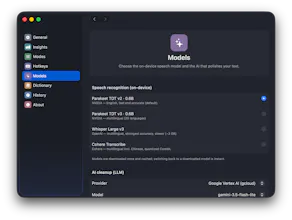
🖥️ On-device speech recognition — choose Parakeet (NVIDIA), Whisper Large v3 (OpenAI), or Cohere Transcribe. They run locally via CoreML on the Apple Neural Engine.
🎭 Modes for how you're writing — Casual keeps your tone for quick messages; Writing does aggressive cleanup for long-form prose with your name dictionary applied; Professional produces clear, punctuated business text. Every mode's prompt is editable in-app.
📖 A personal dictionary — teach it the names and terms it keeps mishearing, and it corrects them in context.
🖊️ Choose how text lands — paste it, type it character-by-character (no clipboard — great for terminals and privacy), or just copy it.
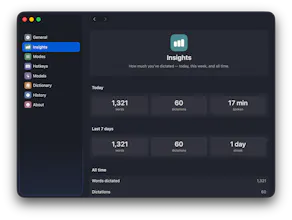
⚙️ Some other details — optional live transcription so you watch words appear as you speak, custom hotkeys, a microphone picker, start/stop sounds, an optional cancel-window before text inserts, launch-at-login, and insights on how much typing time you've saved.
It's a native Swift menu-bar app, MIT-licensed, no accounts or telemetry. Honest caveats: Apple Silicon + macOS 14 only, and it's not notarized yet, so first launch needs a right-click → Open.
Would love your feedback — especially from other non-native speakers or anyone who dictates long-form. 🙏