
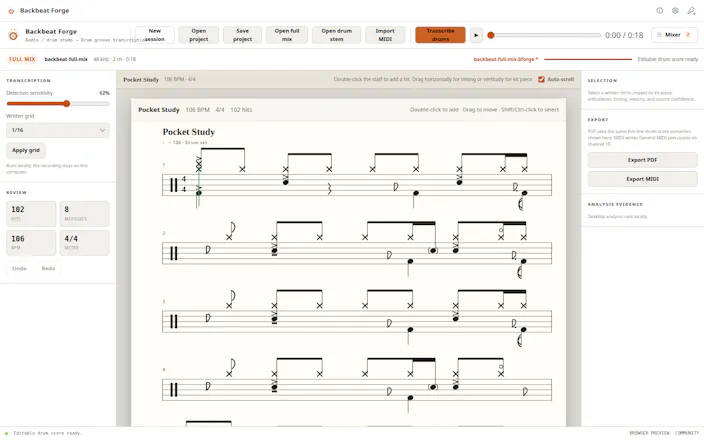
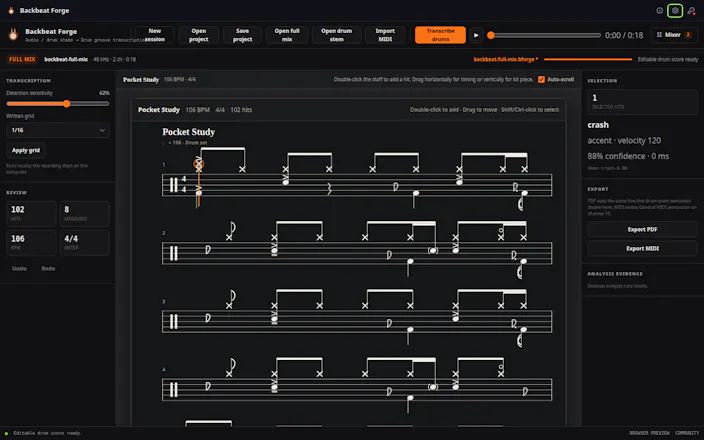
Drop in a full mix or an isolated drum stem. Backbeat Forge puts the performance on a five-line drum score you can check against playback and correct by hand. When the chart feels right, export it as a printable PDF or General MIDI file. It all runs locally.


Viktor.comAn AI coworker that actually does the work

The correct-by-hand-then-export flow is the actual selling point for me — most audio-to-score tools trap the result in their own editor. When I hand-fix a hit — say move a stray note from the hi-hat lane to the ride, or delete a ghost snare — does that edit carry into the General MIDI export as the right instrument on the correct GM drum note, or does export re-run detection and drop my corrections? And does the printable PDF keep the same five-line kit-piece lane mapping I see on screen?
Report


Maker
@leo404 Yes, your manual corrections are the source of truth for export. Backbeat Forge does not re-run detection when you export.
If you move a hit from hi-hat to ride, delete a ghost snare, change its timing, velocity, articulation, or kit piece, those edits are carried into the General MIDI file using the corresponding GM percussion note.
The PDF is generated from the same edited score as well, so it keeps the five-line drum notation and kit-piece mapping you see in the editor. Detection creates the starting point; everything you correct afterward is what gets exported.
Report
Detection as the starting point and my edits as the source of truth is exactly the right split, thanks for spelling it out. One thing that decides whether I use this for a full set rather than a single track: do those corrections persist with the saved project so I can close it and pick the same edited score back up next session, or do they only live in the current editing session? Related, if I have an edited GM MIDI from a previous export, can I bring it back in to keep working, or is audio the only way in?
Report
Maker
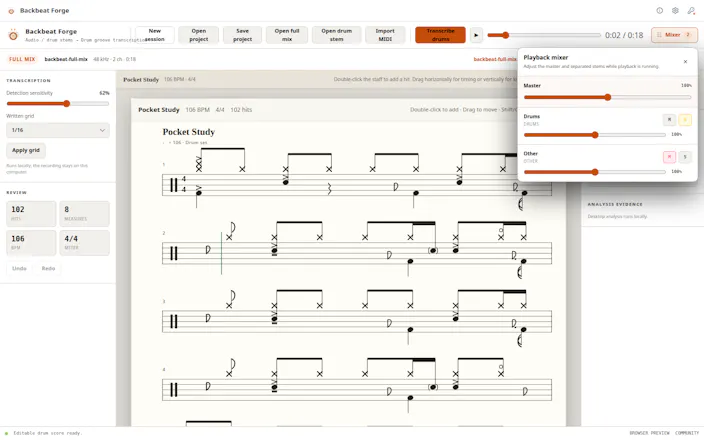
@leo404 Yes, the corrections persist. Saving a .bforge project stores the editable score, including kit-piece changes, deleted or added hits, timing, velocity, and articulation, along with the source reference, analysis settings, mixer controls, and workspace state. You can close the app, reopen the project later, and continue from the same corrected score without running detection again.
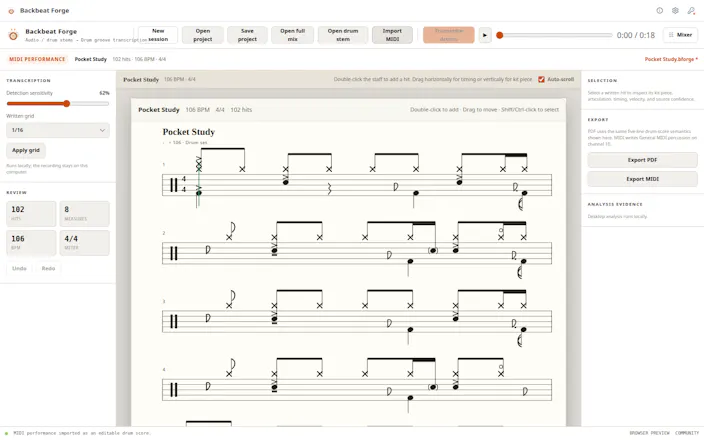
Audio is not the only way in, either. You can import a .mid or .midi percussion file, including a previously exported General MIDI drum track, and continue editing it in the same five-line score workspace.
The only distinction is that MIDI carries the drum events, but not the original audio connection, separated stems, confidence information, or full mixer state. For a longer project or full set, I’d keep the .bforge files as the editable master sessions and use General MIDI for moving the corrected performance into and out of a DAW.
Report

as someone who's tried a few "audio to sheet music" tools before, drums specifically are the part everyone gets wrong because hi-hat vs ride vs crash bleed into each other in a busy mix. does it do okay on a fast double-kick section or does that turn into a mess you end up hand-correcting the whole bar anyway?
Report
Maker
@galdayan Fast double-kick is definitely one of the harder cases. On a reasonably clean drum stem it usually gives you a useful starting pattern, but in a dense or heavily compressed mix you may still need to correct some closely spaced kick hits by hand. Cymbal bleed can also cause occasional hi-hat, ride, or crash misclassification.
The goal right now is not “perfect transcription with zero edits,” but getting close enough that you are fixing a few notes instead of rebuilding the whole bar from scratch. I’m continuing to test and improve it specifically on faster and messier sections.
Report

The GM MIDI export is what sells me here — an editable staff you can actually pull back into a DAW beats a static PDF every time. As a producer I live in swung and triplet-feel grooves (trap hats, shuffle) — does it transcribe those to real triplet subdivisions or snap everything to a straight grid? That's usually where audio-to-score tools fall apart for me.
Report
Maker
@lennoxbeflying That’s exactly one of the harder cases. This is the first version of Backbeat Forge, and right now the written score quantizes to straight 1/4, 1/8, 1/16, or 1/32 subdivisions rather than automatically producing true triplet or swing notation. Shuffle grooves and fast swung trap hats may still need manual timing cleanup.
The original detected timing is retained, and your edits are carried into the General MIDI export rather than being replaced by a new detection pass. Proper triplet subdivisions and swing-aware quantization are a high-priority improvement, and I’m committed to addressing them in future versions. This workflow will keep getting better beyond the initial release.
Report

picking drum transcription specifically instead of full melody transcription is a smart scope. how does it handle a busy mix where the kick and bass are fighting for the same frequency range - does accuracy drop a lot on those or is the model trained to separate that out first?
Report
Maker
@omri_ben_shoham1 You actually called out one of the hardest cases very accurately. Backbeat Forge separates the drum stem first and then runs drum-hit detection, which helps a lot, but busy mixes where the kick and bass overlap can still reduce accuracy and require some manual cleanup.
This is the first version, and improving separation and detection in dense low-frequency mixes is one of the highest-priority areas for future updates. Your comment was spot on, and I really appreciate both the question and the detailed review you left afterward.
Report

Dropped in a rough drum stem and it picked up the ghost notes on the snare way better than I expected, the editable score is genuinely handy for checking fills. Exporting as MIDI instead of just PDF is a nice touch for reworking parts later.
Report
Maker
@helinkavza Really glad it caught those ghost notes! They’re one of the harder parts to transcribe cleanly, so it’s great to hear the editable score helped with checking the fills. MIDI export was important to me too, since a transcription should be something you can keep working with, not just a static PDF.
Report

Hand-correcting beats on a five-line staff feels way more natural than clicking grid cells, and the GM export is a nice touch for sending charts to a real kit. Glad it all stays local too.
Report
Maker
@ayakkab_c11661 Thanks! I felt the traditional five-line staff would be much more natural for drummers than forcing everything into a piano-roll grid. And yes, the GM-compatible export should make it easier to move the result into notation software, a DAW, or another drum workflow.
Report

Local is a good fit for this job. Drum stems and rough mixes are exactly the kind of material people should not have to upload just to get a starting chart. I like that the score stays editable too - AI should remove the blank page, not trap the musician in its first guess.
Report
Maker
@krekeltronics That’s exactly the philosophy behind it. AI should give the musician a useful starting point, not pretend its first result is untouchable. Keeping the score editable preserves that control, and local processing means rough mixes and unfinished material never have to leave the machine. Thanks for putting it so well.
Report
Backbeat Forge
Thanks for the thoughtful and detailed review! I’m really glad the local workflow and editable score helped save time compared with transcribing everything by ear.
You’re absolutely right about dense mixes where the kick and bass overlap. That is one of the more difficult cases, and improving separation and detection accuracy there is an important focus for future updates. The editor is there for manual cleanup, but the goal is definitely to reduce how much cleanup is needed.
If you’re comfortable sharing it, could you send me a short 20–30 second excerpt where the issue occurs? It would be very helpful for reproducing the problem and improving the model. You can send it privately to support@hannes-software.com, and I would only use it for debugging. No worries at all if the audio is private or copyrighted.
Thanks again for trying Backbeat Forge and for pointing this out so clearly!