
Tabula
Share Markdown folders with people and agents easily
11 followers
Share Markdown folders with people and agents easily
11 followers
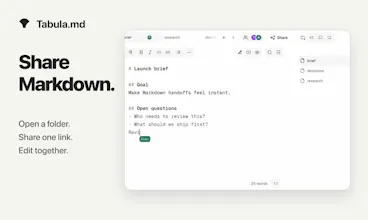
Open a Markdown workspace, create an encrypted room link, and let people or AI agents edit the same files. No signup, no shared AI account, and the result stays portable Markdown.


Free
Launch Team

ClarifyThe Full-Stack AI CRM that replaces 5 tools.
Promoted
Love the no-signup encrypted collab idea, would use it tomorrow. One thing that would seal the deal for me: a small comment sidebar that lets teammates leave inline notes attached to specific lines without modifying the markdown itself. Even a simple "@line 42" thread model would make reviews so much smoother.
@kardelen452289 Hey! You can already do this in Tabula: select text in a document and add a comment from the Comments sidebar. Comments stay attached to the document context without being written into the Markdown file.
But the fact that this wasn’t visible from the product or launch page is useful feedback. I need to make the review workflow much easier to discover. Thank you.
would love a git sync option so I can version control the markdown files directly from a room. Right now if I want history or to push changes to a repo, I have to copy everything out manually which defeats the "portable markdown" angle a bit.
@esmanurwhbv That’s a fair gap. Today you can export the workspace as a zip, so you shouldn’t need to copy files one by one, but you’re right that this isn’t real Git sync. I’m considering a local-folder or CLI bridge that lets Tabula handle the live room while your existing Git workflow handles commits and PRs. Would you mainly want bidirectional sync with a local repo, or a one-click GitHub PR when the session ends?
A live diff view between collaborators would be really helpful, so you can see exactly what changed and who changed it before accepting edits. Right now I imagine it gets tricky to track changes in real time across multiple people and AI agents working on the same files.
@sadk375060 That’s a good point, especially once an AI agent is editing alongside people!
Tabula currently merges live edits immediately, so there isn’t an accept/reject step yet. I’m trying to learn whether the right model is accepting every edit, or reviewing a session-level diff that shows what each participant changed.
Which would be more useful in your workflow: per-edit approval, or a review summary before you export or end the session?
The no-signup room link is such a nice touch, dragged a few teammates into a doc in under a minute. Editing shared Markdown with an AI agent alongside felt surprisingly natural, and I love that it stays portable.
@zekiorak4tgy Thanks — that’s exactly the experience I’m trying to make simple. Which AI agent did you bring into the room, and did you connect it through the hosted MCP or the local package? I’d especially love to know where the agent setup felt less immediate than inviting a person.
Spun up a quick room with a friend and the encrypted link worked instantly, no accounts to juggle. Love that the files just stayed as plain Markdown on my end after we wrapped up.
@berkehdyw Thank you! instant access without giving up plain Markdown is the core bet behind Tabula. What did you and your friend use the room for, and would you use it again for the same kind of work?
Love how the encrypted room links let you skip the whole signup dance and just jump straight into editing together. Keeping it as plain Markdown at the end is a really thoughtful touch too.
@hamdisdan2s3o Thank you — that combination is exactly what I’m testing: collaboration that starts as quickly as sharing a link, without giving up ownership of the underlying Markdown files.
If you try it with another person or an agent, I’d love to hear where the handoff feels unclear.