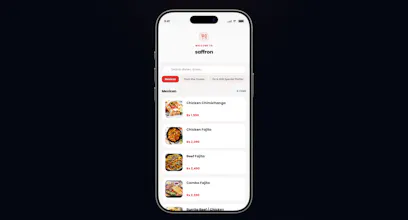
TryMenuly helps restaurants create digital QR code menus in seconds. Upload your menu as a photo or PDF and get a live, mobile-friendly menu with a scannable QR code.
No reviews yetBe the first to leave a review for TryMenuly
Maker
📌
Hey Product Hunt! 👋
Excited to launch TryMenuly, an instant QR menu creator for restaurants.
The idea is simple: upload photos or a PDF of your existing menu, and TryMenuly generates a clean, mobile-friendly QR code menu in under 60 seconds. No design skills, no manual data entry, no app for your customers to downloa, they just scan and browse.
We built this because so many restaurants either overpay for bloated POS-bundled menu software, or are stuck with static PDF menus that look terrible on mobile and can't be updated without a reprint.
A few things we're proud of:
⚡ Speed: menu photo to live QR menu in under a minute
📱 No app needed: works in any phone browser
🔄 Update anytime: change prices or items without touching a printer
📈 We've seen real interest already: thousands of restaurants have already made the switch
We'd love your feedback, especially on how the menu looks on your own phone, and what would make this the obvious choice for a restaurant you know. 🙏
Report
How often does the QR code need to be reprinted if I update menu items or prices, and does it auto-update for customers who already scanned it?
Report
Maker
@remziyeb13215 Great question! The short answer is: Never.
Once you print your QR code, you don’t need to reprint it again. The QR code links to a dynamic URL, meaning all your updates like changing a price, adding a new dish
When a customer scans the QR code, they will always see your absolute latest menu. If they already have the menu open on their phone, they'll see the updates as soon as they refresh the page.
No reprint costs.
Report
How does it handle menu updates after the QR is printed, and is there a limit on how many items or locations one account can manage?
Report
Maker
Menu Updates: Fully dynamic! The QR code never changes; updates to prices or items sync instantly in the background.
Item Limits: Unlimited items and categories.
Location Limits: 1 restaurant per device/account (can be edited or reset at any time).
Report
how does it handle menu updates after launch, do I need to reupload everything or can I edit items directly
Report
Maker
@ahmetgnlda3de8 Because TryMenuly is a zero-login, setup-free tool, we don't have a traditional account dashboard where you can edit items one-by-one.
To update your menu, you return to the site on the same device (which remembers your restaurant), click Upload Menu, and re-upload your updated menu file or photos. Our AI will re-extract the new items and prices for you to review, customize, and publish instantly.
We designed it this way so restaurant owners can get a live menu in under a minute without having to manage yet another username and password!
Report
Uploaded a PDF of our spot's menu and the QR code was ready before I even finished my coffee, looks clean on the phone too.
Report
Maker
@mesutzermaft9h Love this! That’s exactly what we aimed for, getting your menu live in the time it takes to finish a cup of coffee.
Thanks so much for testing it out and for the kind words about the mobile layout. Hope your customers love the clean look!
How often does the QR code need to be reprinted if I update menu items or prices, and does it auto-update for customers who already scanned it?
@remziyeb13215 Great question! The short answer is: Never.
Once you print your QR code, you don’t need to reprint it again. The QR code links to a dynamic URL, meaning all your updates like changing a price, adding a new dish
When a customer scans the QR code, they will always see your absolute latest menu. If they already have the menu open on their phone, they'll see the updates as soon as they refresh the page.
No reprint costs.
How does it handle menu updates after the QR is printed, and is there a limit on how many items or locations one account can manage?
Menu Updates: Fully dynamic! The QR code never changes; updates to prices or items sync instantly in the background.
Item Limits: Unlimited items and categories.
Location Limits: 1 restaurant per device/account (can be edited or reset at any time).
how does it handle menu updates after launch, do I need to reupload everything or can I edit items directly
@ahmetgnlda3de8 Because TryMenuly is a zero-login, setup-free tool, we don't have a traditional account dashboard where you can edit items one-by-one.
To update your menu, you return to the site on the same device (which remembers your restaurant), click Upload Menu, and re-upload your updated menu file or photos. Our AI will re-extract the new items and prices for you to review, customize, and publish instantly.
We designed it this way so restaurant owners can get a live menu in under a minute without having to manage yet another username and password!
Uploaded a PDF of our spot's menu and the QR code was ready before I even finished my coffee, looks clean on the phone too.
@mesutzermaft9h Love this! That’s exactly what we aimed for, getting your menu live in the time it takes to finish a cup of coffee.
Thanks so much for testing it out and for the kind words about the mobile layout. Hope your customers love the clean look!