
Pell
Turn your "text-to-self" chat into a searchable brain.
30 followers
Turn your "text-to-self" chat into a searchable brain.
30 followers
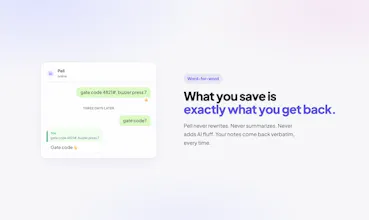
You already text yourself notes. Pell is the same, except it actually finds them when you ask. A WhatsApp contact that remembers everything.




Hi all,
Like a lot of you, my WhatsApp chat history with myself was a total digital junkyard. I’d text myself a gate code, a quick voice note idea, or a photo of where I parked my car, only for them to completely vanish into the scroll abyss.
Traditional note-taking apps have too much friction when you're on the move, but standard chat apps have zero discoverability.
That’s why we built Pell.
It lets you keep using the exact text-to-self habit you already have, but gives that chat a searchable brain. You dump in raw text, voice notes, or photos, Pell quietly drops a thumbs-up to let you know it's saved, and days later you just ask for it back verbatim.
A few quick things you'll love:
- Zero friction: No apps to download, no accounts to create. It lives right in WhatsApp.
- Quiet by design: It reacts with a thumbs-up. No AI-hallucinated conversational fluff or 3-paragraph essays when you’re just trying to log a note.
- Full voice note support: Personally, I use this feature the most. I love just dumping random voice notes into the chat while I'm walking, and later on, I can literally just send Pell a quick voice note back asking it to find those buried messages for me.
It’s completely free to try right now (and works in any language). I’d love to hear your thoughts, feedback, or any wild use cases you find for it.
since it extracts the key info from photos and voice notes rather than keeping the raw media, what happens with something like that parked-car photo example, do you still get the actual image back, or just a text description of it? and for retrieval, if I ask for something ambiguous like "the gate code" and I've texted myself two different gate codes at different times, does it show me both candidates or just confidently hand back its single best guess? a wrong-but-confident answer seems worse than no answer for something like that.
@galdayan Good points,
On photos: Pell doesn't store the raw image, it reads whatever's in it (text, numbers, labels) and saves that as searchable text. But here's the thing, when you ask "where did I park?", the answer actually quotes your original message in the chat, so you still see the photo right there in the reply thread. You don't lose it as long as the chat history is around.
On ambiguity: if you've saved two gate codes, Pell can surface up to 3 matching notes, so you'd see both. And if nothing confidently matches, it just says "nothing saved about that" instead of guessing. The system is explicitly built around the rule that a wrong pick is worse than no pick, so it abstains rather than hallucinate.
@faazabidi "abstains rather than hallucinate" is exactly the right default for this. curious how far back the chat history needs to stretch for the quote-your-original-message trick to still work - does voice notes get the same treatment, where it points you back to the actual audio clip, or does that one get transcribed into text only with no way to hear the original tone/context again?
@galdayan The quote trick works as long as the message is still in the chat. WhatsApp doesn't auto-expire messages, so it stretches back as far as your chat history goes. The only thing that breaks it is if you manually clear the chat or have disappearing messages turned on.
Voice notes get the exact same treatment. Pell transcribes the audio and saves the text, but the answer still quotes your original voice note message, so you can tap it, jump back to it, and play it. You don't lose the original audio, it's still right there in the chat.
@faazabidi good, that's honestly the better version - keeping the original audio reachable instead of making the transcript the source of truth. one clarifying one: if the same voice note gets transcribed slightly wrong (background noise, accent, whatever), does asking about it later fall back to the mistranscription, or does Pell ever go back and re-listen if your question doesn't match well against the stored text
How long does it keep the memory for, and does it use my messages to train anything?
@remzi698130 Hey Remzi, great questions!
We don't use your data to train anything ever. Your media isn't shared or stored as is; we only extract the key info from it and store just that for retrieval. Your memory is kept indefinitely until you explicitly ask to delete it. You have full control, you can tell Pell to forget a specific message, or you can wipe everything at any time.
been using a mess of screenshots and voice notes to myself for ages so this hits close to home. one thing that would push it further for me is grouping memories by topic instead of just a flat search list, so i can ask things like "what was that restaurant you told me about" and get a clean thread instead of twenty random hits to scroll through.
@ensar33961 Hey Ensar, thanks for the feedback! tbh, this is just a validation phase for us, and for the first version, our goal was simply searching and nothing else. Grouping and organizing past messages into clean, topic-based threads is absolutely on our roadmap, and we will be adding many more features to it. Stay tuned!
Finally tried Pell and the search is way better than I expected. Asked it about a recipe my friend sent weeks ago and it pulled it up instantly without me scrolling through old chats.
@narinkonukuank Thanks for trying it out, Narin! Glad we could save you from the dreaded endless scroll. Finding that one specific recipe buried in chat history is exactly why we built Pell. Hope you enjoyed the meal 🍳
Finally a notes system I don't have to organize. I just texted it a reminder and asked it back two days later, and it pulled up exactly what I needed.
@cemile2xna That's the core of Pell. Zero folders, zero tags. Just text and go. We wanted to completely eliminate the friction of organizing. Thanks for trying it out, Cemile! 🚀
finally someone figured out notes need to be searchable. searched for "dentist appointment" from months ago and it pulled up the exact thing i forgot about.
@sedefreyha51464 Thank you, Sedef! We totally agree, standard notes app search usually leaves a lot to be desired. So glad Pell could save the day and dig up that dentist reminder for you :)