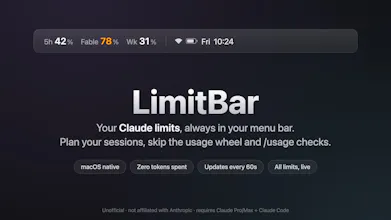
If you're powerusing Claude Code (esp. with Fable), the usage limits are your work budget. LimitBar keeps all of them in your Mac menu bar, updated every 60s, so you can plan your day instead of re-running /usage or clicking the usage wheel all the time. Native Swift, under 1 MB, no Electron. Reads the same numbers Claude shows you and spends zero tokens doing it. Unofficial, not an Anthropic product. €2.99, source included.
No reviews yetBe the first to leave a review for LimitBar
Maker
📌
Hey PH! I use Claude Code all day on a Max plan, and at some point I noticed I was planning my whole workday around the usage limits: the 5-hour window decides when I start a heavy session, the weekly cap decides what gets pushed to next week. The annoying part was that meter is invisible unless you keep clicking the usage wheel or running /usage. I was checking it constantly.
So I built LimitBar for myself first: a tiny native menu bar app that shows every limit Anthropic reports on your account (5-hour window, weekly, per-model like Fable), refreshed every 60 seconds. Reading the numbers never invokes a model, so watching your budget costs none of your budget. And hitting limits mid-session never catches you by surprise anymore.
Two things changed a lot on the way to launch. First, the pitch. I assumed the selling point was avoiding surprise lockouts, but after living with it for a while it became obvious the real value is calmer planning, so the whole product got reframed around that. Second, my first test user hit a wall of macOS permission dialogs, so I rewrote the Keychain handling to go through Apple's own security tool. Most Macs now see zero permission popups.
it's unofficial and not affiliated with Anthropic. macOS 13+, needs Claude Code logged in on a Pro or Max plan. €2.99 one time, 30-day refund, and the source ships in the download and compiles locally on your Mac, so you can read exactly what runs.
I built it with Claude Code, while watching LimitBar count what building it was costing me. Happy to answer anything.
Report
How does it actually read those numbers from Claude Code without an API hook, just scraping the local session data or something else?
Report
Maker
@nerimand1c7 it is an API call in the literal sense. What I meant is it's not the public developer API and not hooked into Claude Code's process. LimitBar calls the same internal usage endpoint Anthropic's own clients use, with your existing login. Appreciate the question!
Report
Finally something that lives in my menu bar and actually respects my machine, sub-1 MB Swift is a treat. The 60s polling feels right and seeing the numbers without spawning a /usage command is genuinely useful for pacing long sessions.
finally something that just sits in the menu bar and does one job well, the 60s refresh is fast enough that i stopped thinking about it, native swift at under 1MB is a nice flex too
Report
Maker
@sibel8d87 much appreciated 🙏 how has your experience been otherwise, using it?
Report
Love this idea. I work on pc mostly so not for me but I often have a tab wasted to keep checking on this. Nice clean way to visualize.
Report
Maker
@mjohnson42 much appreciated. Where would you want this on your screen on your PC - same place or somewhere else?
Report
@meekydubs1 hmmm not sure - maybe in the start menu on pc? But also to be honest I wouldn’t pay for it. I still think it’s a great idea and wish you luck!
Report
Maker
@mjohnson42 really helpful feedback. Why wouldn't you pay for it? Would you purchase it at 99 cents?
Report
@meekydubs1 honestly because using another tab isn’t that bad and if I wanted I could vibe code it and I would be hesitant to allow a 3rd party to connect into my Claude account
How does it actually read those numbers from Claude Code without an API hook, just scraping the local session data or something else?
@nerimand1c7 it is an API call in the literal sense. What I meant is it's not the public developer API and not hooked into Claude Code's process. LimitBar calls the same internal usage endpoint Anthropic's own clients use, with your existing login. Appreciate the question!
Finally something that lives in my menu bar and actually respects my machine, sub-1 MB Swift is a treat. The 60s polling feels right and seeing the numbers without spawning a /usage command is genuinely useful for pacing long sessions.
@kumsalukh1 much appreciated!
finally something that just sits in the menu bar and does one job well, the 60s refresh is fast enough that i stopped thinking about it, native swift at under 1MB is a nice flex too
@sibel8d87 much appreciated 🙏 how has your experience been otherwise, using it?
Love this idea. I work on pc mostly so not for me but I often have a tab wasted to keep checking on this. Nice clean way to visualize.
@mjohnson42 much appreciated. Where would you want this on your screen on your PC - same place or somewhere else?
@meekydubs1 hmmm not sure - maybe in the start menu on pc? But also to be honest I wouldn’t pay for it. I still think it’s a great idea and wish you luck!
@mjohnson42 really helpful feedback. Why wouldn't you pay for it? Would you purchase it at 99 cents?
@meekydubs1 honestly because using another tab isn’t that bad and if I wanted I could vibe code it and I would be hesitant to allow a 3rd party to connect into my Claude account