
VisuTry
Free private face-shape check for smarter glasses choices
10 followers
Free private face-shape check for smarter glasses choices
10 followers
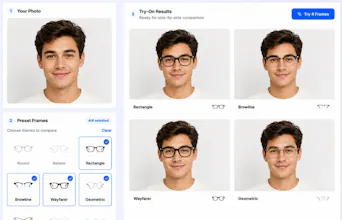
VisuTry adds a free, private face-shape detector that runs on-device with no login or credits. It shows measured facial proportions and turns the result into practical glasses guidance, then lets shoppers preview product images and compare frames before buying. It is a visual style aid, not medical or physical-fit advice.



How does it handle different lighting or angles when measuring the face shape on-device, and does the preview feature work with frames from any retailer or only ones you have catalogued?
@hamzaerguvan The detector works best with one front-facing photo, even lighting, level eyes, and a clearly visible face outline. We validate landmark availability and pose; if the face is too tilted, turned, off-center, too small, or landmarks can’t be detected reliably, we ask the user to try another photo. We don’t currently score lighting independently, so good, even lighting is still important.
The on-device scan ran in a few seconds with no sign-in, and seeing my actual measurements next to frame suggestions was genuinely useful. The preview overlay made it easy to picture how a pair would actually sit on my face before clicking buy.
Finally tried this on a few old photos and the on-device face shape reading was way more accurate than I expected, no signup needed. The side-by-side frame preview actually made a difference for me instead of guessing in store.
ran the face shape detector on my laptop and it picked up my proportions in a couple seconds, no signup. The frame comparison view is genuinely handy before I buy.
Does the face-shape detection actually run fully offline in the browser, or is there still some lightweight model call happening behind the scenes?