
Super 3D Pro
A practical Image-to-3D WebUI
6 followers
A practical Image-to-3D WebUI
6 followers
Contribute to ceil-z/super-3d-pro development by creating an account on GitHub. Image-to-3D with local draft generation and TripoAI cloud integration


Launch Team

Framer AI AgentsDesign and publish professional sites with AI
Promoted
Hi everyone,
I’m excited to share Super 3D Pro – an open‑source, self‑hostable web application that turns a single image or a text prompt into a high‑quality 3D model.
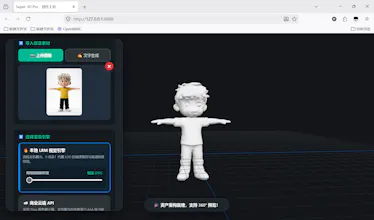
You can run it fully locally (using TripoSR + baking) or use cloud APIs (Tripo + Agnes AI) for even higher quality. The UI is built with Three.js so you can instantly preview, orbit, zoom, and export your model.
🔗 GitHub repo: [Insert your GitHub link here]
💡 Live demo (optional): [Add if you have one]
✨ Key features
Two input modes
🖼️ Image → 3D (upload any photo, background removed automatically)
📝 Text → 3D (powered by Agnes AI image generation → Tripo)
Two generation engines
🖥️ Local (TripoSR) – fast, runs on GPU/CPU, no API key needed
☁️ Cloud (Tripo API) – higher detail, PBR materials, ideal for AAA‑like assets
Interactive 3D viewer
Drag to rotate / pan / zoom
Real‑time GLTF/GLB preview
Export formats – .glb or .obj (as ZIP with textures)
Batch processing – upload multiple images, generate one model after another
Rating system (RLHF) – help improve future models by rating results
Completely open‑source – no hidden telemetry, no paywalls
🧠 Under the hood
Backend: FastAPI + asyncio + background tasks
3D viewer: Three.js (WebGL) with Draco & GLTF support
Background removal: rembg + ISNet (local)
Local 3D reconstruction: TripoSR (from Stability AI) with texture baking
Cloud option: Tripo API (tsk_ keys) + Agnes AI for text‑to‑image
All processing happens on your machine (when using local mode) – no data leaves your computer unless you explicitly use cloud APIs.
🚀 Getting started (5 minutes)
bash
Then open your browser to http://127.0.0.1:8888 – that’s it.
Note: for local mode you need PyTorch with CUDA (if you have a GPU). Cloud mode only needs an API key.
📸 Example workflow (local)
Upload a photo of a character, object, or toy
Optional: adjust output resolution (256–512)
Click Generate – wait 20–40 seconds
Preview the 3D model in the viewer
Export as .glb or .obj (with textures)
Text mode works similarly: enter a prompt + your Agnes API key → it generates an image first, then the 3D model.
❤️ Why open source?
I built this because I wanted a clean, modern, one‑click UI for 3D generation that I could run locally or extend easily.
Most existing solutions are either closed source, require complex command lines, or are tied to a single cloud service.
Super 3D Pro is my attempt to give back to the community – free, transparent, and hackable.
If you find it useful, please ⭐ star the repo – it helps others discover it.
And if you’d like to support my work, there’s a PayPal link inside the app (or you can sponsor me via GitHub).
📢 Call to action
Try it, break it, report issues
Add your own engine (Hunyuan3D, Stable Zero123, …) – the pipeline is modular
Share your generated 3D models with #Super3DPro