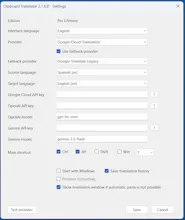
Clipboard Translator brings instant translation directly into your Windows workflow. Unlike traditional translators that require switching apps, copying and pasting text into a website, Clipboard Translator works from any Windows application using global keyboard shortcuts. Translate clipboard content, translate selected text in popup windows, and choose between Google Translate, Google Cloud Translation, Gemini, or OpenAI. Fast, lightweight, and designed to keep you focused.
No reviews yetBe the first to leave a review for Clipboard Translator
Maker
📌
Hi Product Hunt! 👋
I'm excited to introduce Clipboard Translator.
The idea came from a simple frustration: translating text while working on Windows always interrupted my workflow. Every time I needed a translation, I had to copy text, switch to a browser or translation app, paste it, translate it, copy the result, and then return to what I was doing.
I wanted translation to feel invisible.
Clipboard Translator runs in the system tray and lets you translate clipboard content or selected text from virtually any Windows application using keyboard shortcuts. The translated text can replace the clipboard content instantly or appear in a popup window, allowing you to keep working without switching apps.
It supports Google Translate, Google Cloud Translation, OpenAI and Gemini, giving users the freedom to choose the translation provider that best fits their needs.
I'd love to hear your feedback:
• Would this fit into your daily workflow?
• Which translation provider do you prefer?
• What features would make it even more useful?
Thank you for checking it out and supporting independent makers! 🚀
Miguel Ángel