
ClipSalvage
Recover deleted Tesla Sentry Mode footage from USB drives
5 followers
Recover deleted Tesla Sentry Mode footage from USB drives
5 followers
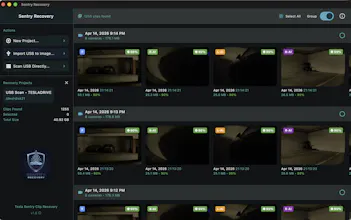
Recover deleted Tesla Sentry Mode and TeslaCam video from formatted USB drives — even when the file system is gone. It scans the raw drive for Tesla MP4 signatures, and on-device AI restores the correct Tesla camera angle when filenames are lost. $49 one-time, macOS and Windows.


Free Options
Launch Team

Render: Get up to $100K in startup creditsThe fastest way to deploy and scale apps and agents
Promoted
Step-by-step recovery guide: https://www.clipsalvage.com/guide.html
Tesla's USB recorder is brutal about overwriting — a few days of new Sentry events and your old footage is gone, even though the data usually lingers on the drive until those exact sectors get reused. ClipSalvage scans the raw drive for Tesla's MP4 signatures, rebuilds the original filenames and camera angles (with a small on-device vision model when Tesla has already wiped the directory entry), and scores how cleanly each clip will play back — all locally, nothing uploaded. Free to scan and preview everything; if your clips are there 3 free recoveries and $49 for unlimited access lifetime. Happy to answer questions about how the carving works.
Hey Product Hunt 👋
ClipSalvage launched here in June as a recovery tool: your Tesla USB drive got formatted, the clips are still physically on it, and this finds them by scanning raw sectors for MP4 signatures rather than trusting the filesystem.
Then Tesla shipped 2026.20 and encrypted the clips.
If you've pulled your USB since that update, you may have already hit this — the files are there, they're the right size, and nothing will play them. They're not MP4s anymore. They're encrypted containers, and every tool that looks for an MP4 header now walks straight past them.
So v2.20 does two things:
🔓 Batch decrypt and export — plug in an intact TeslaCam drive, and it walks the whole thing and writes out plain playable MP4s. Nothing deleted, nothing damaged, you just want your footage watchable again.
🔧 Recovery of deleted encrypted clips — the harder case. Formatted or corrupted drive, encrypted clips, all of it. It carves them off the raw drive and decrypts them. Where a clip was partly overwritten, it rebuilds a playable MP4 from whatever video frames survived and labels it "repaired" — I'd rather show you 70% of the footage honestly than hand you a broken file and call it recovered.
Detection is fully offline. One Tesla account login fetches the per-clip keys, then they're cached locally — rescan the same drive as often as you like, no further calls.
The other thing I'm proud of: Tesla constantly recycles directory entries, so on a drive that's been in the car a while, most original filenames are gone even though the video is perfectly intact. Every clip gets a thumbnail decoded locally, and an on-device model reads it to identify which of the six cameras shot it — so clips still land with proper names and in the right Sentry event instead of a folder of file0001.mp4. Anything the model guessed carries an -AI badge in the grid, so you always know what came from actual bytes on disk and what was inferred.
Everything runs on your machine. No footage, thumbnails, or drive contents ever leave it. Mac (Apple Silicon) and Windows 10/11, one-time purchase — $29 for everything, or $9.99 if you only need the decrypt side. Scanning and previewing is free, so you can confirm your clips are actually recoverable before paying anything.
ClipSalvage Decrypt is now FREE!
Enjoy unlimited batch decrypt sessions in a new UI!
Please download version 2026.37 or newer