
Tubeup
Automate YouTube uploads — unlimited videos, AI Powered.
26 followers
Automate YouTube uploads — unlimited videos, AI Powered.
26 followers
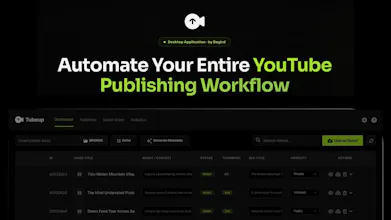
Tubeup is a desktop application that gives you unlimited YouTube uploads, AI-generated metadata (SEO-optimized titles, descriptions, tags, hashtags), dynamic descriptions, automated file management, unlimited channels support, and social media copy generation — all from a single desktop app that runs 100% locally on your machine. Zero daily upload caps. Dual upload engine for full flexibility. Schedule content ahead. Auto thumbnail detection. One-click automated bulk actions.


Free Options
Launch Team / Built With


Dropbox SignSimple, secure eSignatures for the way your team works.
Promoted
Hey Product Hunt! 👋
I'm RAKIBUZZAMAN, the maker of Tubeup — and I'm beyond excited to finally share it with you today.
Why I built this:
I run multiple YouTube channels. And every single day, I was drowning in the same repetitive publishing grind: open YouTube Studio, drag a video in, manually type a title, write a description, add tags, pick hashtags, choose a playlist, set visibility, declare audience settings… and then do it all over again for the next video. And the next one. And the next one.
For a single video, it takes 10–15 minutes. For 10 videos, that's half a day gone — and I haven't even started promoting them on social media.
I kept asking myself: why am I spending more time uploading than creating?
So I built Tubeup to solve this — permanently.
What Tubeup actually does:
Tubeup is a desktop app that replaces your entire manual YouTube publishing workflow. Here's the full picture:
🚀 Unlimited Bulk Uploads — No Daily Cap
YouTube's standard API restricts you to ~6 uploads per day. Tubeup's "Easy Unlimited Uploads" engine completely bypasses this limit. Upload 10, 30, or 50+ videos in a single session. One click starts the entire batch — every video goes live with its metadata, thumbnail, playlist, and visibility already configured.
🤖 AI-Powered SEO Metadata (Gemini AI)
Stop staring at blank title fields. Tubeup uses Google's Gemini AI to auto-generate SEO-optimized Titles, Descriptions, Tags, and Hashtags for every video — individually or in bulk. What used to take hours of writing now happens in seconds, and the output is search-optimized from day one.
📝 Dynamic Description Builder
Your brand links, social profiles, sponsor URLs, and video timestamps are automatically assembled into every description. Set them once in Settings — every video gets your full professional branding without you copy-pasting a single line.
📺 Unlimited Channel Management
Connect as many YouTube channels as you want. Each channel gets its own playlists, settings, and upload queue. Solo creators with two channels, agencies managing ten — it all works from one dashboard.
📅 Smart Scheduling
Set individual publish dates for every video in a batch. Upload a week's worth of content in one session, and each video goes live at exactly the right time. Your channel stays consistent even when you step away.
🖼️ Auto Thumbnail Detection
Drop your thumbnail images into a folder with matching filenames. Tubeup finds and attaches them automatically during upload — no manual drag-and-drop, no forgotten thumbnails.
📱 Built-in Social Media Copy
For every published video, Tubeup generates tailored social posts for Facebook, Twitter/X, LinkedIn, and Instagram. Click "Copy," paste it, post it. Drive early views from every platform without writing a single word.
📊 Real-Time Channel Analytics
Track views, growth, and content performance directly inside Tubeup. No need to switch to YouTube Studio in a browser — your numbers are right there on your dashboard.
🔒 100% Local & Private
Everything runs on your machine. Your video files, metadata, channel credentials, and strategies never leave your computer. The only outbound connections are to YouTube (for uploads), Gemini AI (for metadata generation), and the license server (for activation). That's it. Your data stays yours.
Who is this for?
→ High-volume creators publishing multiple videos daily
→ Faceless channel operators running 5+ channels at scale
→ Content agencies managing client YouTube accounts
→ Solo creators who want to reclaim hours every week
I've poured months of work into making this the tool I wish existed when I started scaling my channels. I'd love for you to try it and tell me what you think.
🔗 Check it out: https://degird.com/products/tubeup
Your feedback, questions, and suggestions are genuinely welcome. I'll be here all day responding to every comment.
Let's go! 🚀
RAKIBUZZAMAN The local-first approach is compelling, especially for creators managing multiple channels at scale. How does Tubeup handle YouTube API limits and account safety when users are uploading large volumes of content across several channels?
@nicole_hynek Thank you for asking!
To solve this, Tubeup uses our "Easy Unlimited Upload Engine", which doesn't rely on the YouTube API for uploads. That means Tubeup itself has no API upload limits, allowing you to upload unlimited videos across unlimited channels.
The only limits are the ones set by YouTube on your channels. If your channel is allowed to upload, Tubeup can handle bulk uploads at scale.
There's also a completely free trial (no payment required), so feel free to try it out:
https://degird.com/products/tubeup#pricing
@flytorakib That's a clever approach. Bypassing API upload limits while still working within YouTube's own channel restrictions seems like a practical solution for creators managing content at scale.
My biggest concern with high-volume uploading is usually account safety rather than upload capacity, so it's good to hear the platform is designed around YouTube's existing permissions and limits. Really interesting product—awesome work on this!
RAKIBUZZAMAN The local-first workflow angle stands out here. For Shareday, we also think a lot about reducing repeat planning work without making the result feel generic, so the combination of bulk metadata, scheduling, and channel-specific social copy is interesting.
How are creators using Tubeup to keep descriptions and tags consistent across channels while still making each upload feel tailored?
How are you getting around YouTube’s usual daily upload limits, is it just batching and scheduling via the API?
@naimz Good question!
No, Tubeup isn't just batching or scheduling uploads through the YouTube API. We offer both API-based uploads and our Easy Unlimited Upload Engine, which doesn't consume YouTube API quota, so you're not limited by API upload quotas.
Tubeup can also schedule videos during the upload process based on your selected publish date and time. The only upload restrictions are those imposed by YouTube on your channel—not by Tubeup.
There's also a completely free trial (no payment required), so feel free to try it out:
https://degird.com/products/tubeup#pricing