
Claude Code Rendering
Mouse support and flicker-free rendering for Claude Code
142 followers
Mouse support and flicker-free rendering for Claude Code
142 followers
Claude Code's new opt-in renderer virtualises the viewport, eliminates flicker, adds mouse events, and keeps memory flat in long sessions. For developers running Claude Code in VS Code, tmux, or iTerm2.



Free Options
Launch Team

Tines The single, secure environment for agents, apps, and automations.
Promoted
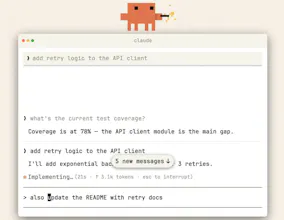
Claude Code Fullscreen Rendering is a new opt-in renderer for the Claude Code CLI that virtualises the terminal viewport and adds mouse support.
It solves the core UX problem in terminal-based AI coding: ANSI escape codes lack a mechanism to repaint rows outside the viewport, so every update forces a full-screen clear. That's the flicker.
Fullscreen rendering moves viewport control into the application layer, the same way Vim and Htop do it.
What makes it different is that it eliminates flicker without sacrificing terminal portability, no external TUI framework, and no new dependencies.
It supports click-to-position cursor in the input box, click-to-expand tool results, URL and file path clicking, mouse-wheel scrolling, transcript search with less-style navigation, and constant memory and CPU usage regardless of conversation length.
Built for developers running Claude Code in VS Code's integrated terminal, tmux, or iTerm2, especially in long sessions where flicker and scroll jumps are most disruptive.
Enable it with: CLAUDE_CODE_NO_FLICKER=1 claude
Note: this is a research preview. Native cmd-f and copy-paste behave differently in this mode. Full tradeoff details in the docs.
https://code.claude.com/docs/en/fullscreen
P.S. I hunt the latest and greatest launches in tech, SaaS and AI, follow to be notified → @rohanrecommends
@rohanrecommends How does mouse support change your typical workflow? Does it feel more "IDE-like" in tmux, or still pure terminal soul?
This is solving a problem I've been annoyed by for months. The flicker during long Claude Code sessions in tmux is genuinely painful - especially when you're trying to read tool results while the model is still generating. The Vim-style viewport approach makes total sense. Already enabled it with the env var and the difference is immediately noticeable. Mouse wheel scrolling through long conversations is a game changer too.
flicker in the CLI has been one of those papercuts i didn't realize was bugging me until i saw a smooth render. is this built on a custom TUI layer or using something like ink/ratatui under the hood?
VS Code has its own integrated terminal with a lot of rendering quirks. Does the viewport virtualisation behave differently there vs a native iTerm2 window? Curious whether VS Code's terminal layer adds friction or if it just works the same as a standard TTY.
oh nice, the memory staying flat in long sessions is huge. the flickering in terminal was one of those small things that really added up over time. mouse support is a great bonus too
Wow. This is much useful. Would try it for sure.