
Launching today

Room Service
The Mac cleaner built for developers
94 followers
The Mac cleaner built for developers
94 followers
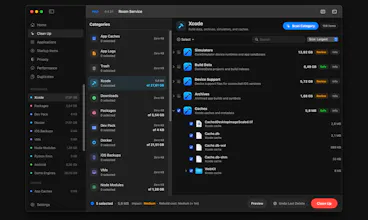
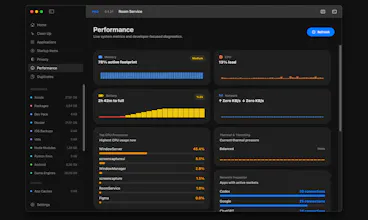
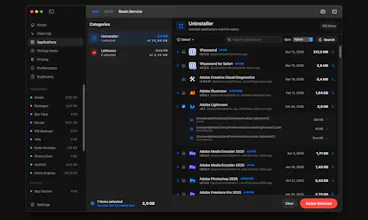
Room Service helps developers understand what is actually filling their Mac, then clean it with more confidence. From Xcode build data and package caches to Docker, generated folders, app leftovers, duplicates, and privacy traces, it turns scattered disk clutter into a workflow you can inspect, review, and act on without losing control.




Room Service
Hey Product Hunt, I built Room Service after getting frustrated with how generic most Mac cleaners feel.
On my machine, the problem was never just “junk.” It was Xcode build data, package manager caches, Docker data, generated folders like node_modules and .venv, app leftovers, duplicates, privacy traces, shared game engine caches and logs, and a general lack of visibility into what was actually happening on disk. Most tools I tried either missed too much or reduced the whole experience to risky one click cleanup.
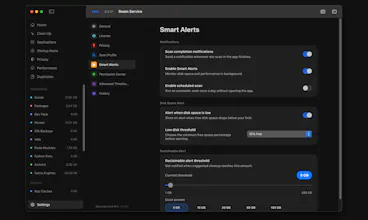
I wanted something that felt more transparent and more useful day to day. That is what Room Service became, a Mac cleaner built for developers, with a real home dashboard to keep disk usage and reclaimable space easy to follow, developer focused scan coverage, a review first cleanup workflow, a dedicated Performance workspace for live system metrics, Startup Item management, Applications and Leftovers cleanup, Privacy Mode, PIN protection, Touch ID support, Smart Alerts, Quarantine and Undo for safer deletes, and a shared desktop and CLI workflow.
The goal was not to make another generic cleaner. It was to build a cleanup tool that fits the way developer Macs actually fill up, and gives you enough visibility and control to trust what happens next.
Thanks for checking it out.
As a small thank you for the Product Hunt launch, I set up a 50% discount for the community, valid for the next 2 days: https://bit.ly/3NjKctQ
@ardacankrko How secure is this anyway..?
And it's free as far as i know, would there be a future paid plan?
Room Service
@heismiracle All scan features are currently free, and cleanup actions are available with the Pro plan.
On the security side, that’s actually a core focus of Room Service. There’s no automatic one click cleanup. Everything is fully user controlled. You can review everything before taking action, and even choose between moving files to Trash or deleting them permanently.
The app also includes PIN protection and Touch ID support for additional security.
@ardacankrko Where do we see the pricing?
Room Service
@himani_sah1 Thanks for asking.
Pricing is available here on Gumroad: https://ardacankirko.gumroad.com/l/zfsjob
@ardacankrko Congrats on the launch, Arda! 🎉 Funny timing — two Mac cleaner tools launching on the same day, both developer-focused. Going to try you both and see which sticks. The Xcode build data and derived data cleanup is what caught my eye immediately — as an iOS dev building OceanMind, an AI-powered breathwork app, that folder alone has eaten gigabytes I didn’t know were gone. Love the review-first approach rather than one-click nuke. The CLI workflow is a nice touch too. What’s the diff between Room Service and Cacheless that also launched today — would you say yours is more control/transparency focused vs their AI explanation angle?
Room Service
@alexeyglukharev Thanks a lot, Alexey, really appreciate it. And yeah, you nailed exactly what I was trying to build here. The goal with Room Service is very much developer-first, with full control staying in the user’s hands rather than abstracting things away too much.
Also yes, funny timing with Cacheless 😄 It’s a nice coincidence. It looks great and I think the AI-driven explanation angle is genuinely interesting. I was actually considering going in that direction early on, but as I focused more on real developer workflows, it started to feel like AI wasn’t the right core for this problem.
As an app and game developer myself, I really needed something that solves my own day-to-day issues first. Things like disk bloat during development, Xcode build data, and even in projects I’m actively working on like @Klynn , where build-related growth can get out of hand and hard to track.
So the direction I chose was more about visibility and control rather than automation or interpretation.
Curious to hear your thoughts after trying both 🙌
Damn, the idea is great and the app overall is too. I scanned, found the files I wanted to delete, but the monetization style of "we'll hit you with a paywall on the last screen and block the actual action" is a killer. In the end, I just ran rm -rf on the files I needed, so thanks for that anyway!!
Room Service
@redzumi Thanks, really appreciate the honest feedback and glad the scanning part was useful. You’re right about the paywall at the action step, that’s something I’m planning to improve UX-wise. The idea behind the current setup is to keep more than half of the value free, especially the full scan and visibility part, so you can see exactly what’s taking space before deciding. But I totally get how that last step can feel frustrating. I’ll definitely work on making that experience better. Thanks again for trying it and sharing this 🙏
This seems perfect for Mac users! I’m not sure why, but every time I hit “Clean Up” after selecting all the junk files found in the scan, the app crashed 😔
Still, this feels like a long overdue app for Mac Users, and I’m excited to see where you take it.
Room Service
Thanks, @bioshawna really appreciate this and glad it feels useful overall.
I haven’t run into this crash in testing across different machines so far, but I’ll definitely look into it right away.
Room Service
Hey @bioshawna , quick update.
I was able to track down the issue and just released a fix. The update is now live. (0.4.22)
Thanks again for reporting this, it really helped.
developer machines accumulate junk differently than regular users - node_modules alone can get out of hand fast. curious what the most common space hogs you find are. I am guessing it is a mix of build caches, old simulator runtimes, and abandoned Docker layers.
Room Service
@mykola_kondratiuk Yeah, you’re pretty much spot on. The most common ones I keep seeing are Xcode derived data, node_modules across old projects, and Docker images/containers that just pile up over time.
Simulator runtimes are another big one, especially if you’ve been developing for a while. What surprised me the most though is how much space comes from “active” projects, where build-related data keeps growing and you don’t really notice it until your disk is suddenly full. Curious if your experience matches that too.
Xcode derived data is basically a rite of passage - every dev has had that moment of finding 40GB of it sitting there. Docker images are sneaky too since they just quietly stack up. glad this exists.
Finally something that understands dev Macs are a different beast. My 512GB fills up fast between Xcode derived data, stale node_modules in forgotten projects, and Docker images I forgot about. The review-first approach is smart — I've been burned by cleaners that nuked things I actually needed. The CLI workflow is a nice touch too.
Room Service
@letian_wang3 Thanks, really appreciate this. That’s exactly the pain I kept running into as well.
Those “where did my disk go?” moments are way too common with Xcode, node_modules, and Docker. That’s why I went with a review-first approach instead of anything automatic. Glad it resonates, and happy to hear the CLI workflow feels useful too 🙌
Yeah sorry not a fan of the illusion of a free tool and then when you want to actually use it you have are hit with a paywall... it should be UPFRONT/ transparent.
I wasted my time after getting all excited about a potentially cool new tool.
This gets a down vote in my book just because of that - even if the tool seems qualitative.
Room Service
@exlemor Thanks, really appreciate you taking the time to share this. And sorry it felt misleading, that’s definitely not the experience I want to create. The idea was to keep all scans fully free so you can see everything before deciding, but I understand how the paywall at the action step can feel frustrating. Based on feedback like yours, I’ve just added a clearer section on the landing page to make this more upfront and avoid confusion. Thanks again for calling it out 🙏
Room Service
@exlemor Also, I’ll be improving this inside the app as well. In the next update, I’ll make the free vs paid distinction much clearer UX-wise so it’s more upfront and less frustrating.
Does it detect Xcode derived data automatically or do you need to point it to specific folders? Congrats on the launch!
Room Service
Thanks, @borrellr_ appreciate it.
It detects Xcode derived data automatically, no need to point it to specific folders. Right now there’s a general scheduled scan in place, but category-specific alerts like that are a great idea. I’ll look into adding more granular, category-based alerts in upcoming updates.