
Launched this week

CueNotch
Look like you memorized everything. You didn't.
98 followers
Look like you memorized everything. You didn't.
98 followers
CueNotch puts your script inside your MacBook notch right next to the camera. Ghost Mode makes it invisible on Zoom, Teams, Meet and Loom. Voice-synced scrolling. Reading scripts without making eye contact gets your audience's trust level on you low as maintaining eye contact is what makes you genuine. Think cuenotch as your macbooks dynamic island but with a purpose.
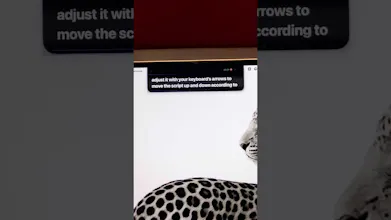
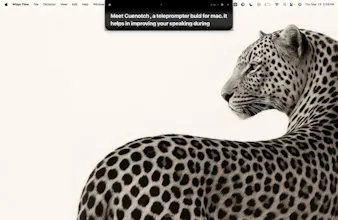
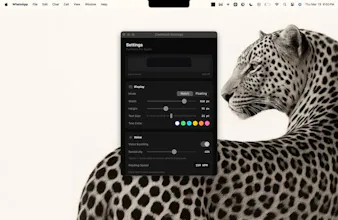


Here's the story. I’m a developer and a student, not a content creator. Making demo videos for Product Hunt, delivering PowerPoint presentations, and recording tutorials all require one skill that no one talks about: looking directly into the camera, speaking confidently for minutes, and remembering your script. For people like me, who aren’t naturally good at this or who’d prefer to focus their energy on more important aspects of their careers, it’s genuinely difficult. Most professionals know this feeling. The moment your audience sees you reading from your slides, they stop paying attention. Eye contact is crucial. That’s exactly why I created CueNotch. It allows you to write a separate script for your presentation and displays it right next to the camera on your MacBook’s notch. This helps you maintain natural eye contact the whole time. No more looking down. No more retakes. And for those worried about screen sharing, don’t be. CueNotch is completely invisible to Zoom, Teams, Meet, Loom, and OBS. Your audience sees your slides, and you see your script. Nobody else knows. I built this for fellow developers, students, content creators, and anyone who regularly gives presentations or makes videos and is tired of memorizing scripts. I can't wait for you all to try it. Please drop your feedback in the comments; I’m reading every single one!
@siddharth_r4 Great work here! Does CueNotch support remote scroll control (e.g., from a Bluetooth clicker or Apple Watch) for presentations and video recordings where keyboard access isn’t practical?
@jerrybyday damn thats a great great question , we have short cuts in keyboard to activate the notch but not this , i love this comment im surely going to work on this , within a week your going ot see this feature , genuinely this is something i didnt think about thanks mate!!
Does the ghost mode work reliably across all video call platforms or are some trickier than others? Congrats on the launch!
@borrellr_ it works everywhere , i explicitly focused on doing that cause im the biggest user of my own product , once didnt work in a ppt presentation in full screen so focused on that part and made it work everywhere!!