Launching today
Spoken

Spoken

Hands-free dictation that works anywhere on Windows

35 followers

Transform your voice into text with Spoken. Professional, private, and accurate speech recognition that runs entirely on your computer.
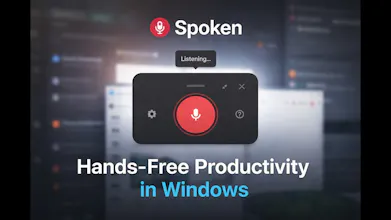
Spoken gallery image
Free Options
Launch Team / Built With
Famulor AI
Famulor AI
One agent, all channels: phone, web & WhatsApp AI
Promoted

What do you think? …

Antonie Potgieter
Two days ago, I had a shoulder operation. I’m currently working with one arm, and almost immediately something became very clear: modern computing assumes full mobility. Windows has a built-in utility and there are many other tools available, but I wanted to build my own so that I can customize it and have an extremely efficient flow. Typing, switching apps, taking notes, replying to messages - all of it becomes friction-heavy the moment one hand is out of the equation. I still wanted to work, think, and create - I just didn’t want the keyboard to be the bottleneck. That’s what led me to build Spoken. Why I Built Spoken Spoken is a lightweight voice-to-text application for Windows. You speak, it transcribes, and it types directly at your cursor - in any application. No copy-paste. No special editors. No workflow changes. You focus the app you’re already using, press a button, and start speaking. How It Works The goal was simplicity, especially while recovering: Continuous mode – pause naturally and it transcribes automatically Manual mode – speak freely and transcribe when you’re ready Model selection – choose and download the transcription model that fits your needs Article content Built one-handed. Used hands-free It works anywhere your cursor is active - editors, browsers, chat apps, terminals. Built Out of Necessity (and Used Immediately) This wasn’t a “someday” idea. I built and started using Spoken during recovery, because I needed a way to stay productive without forcing myself into uncomfortable or inefficient workflows. And something interesting happened: even with one arm, work felt smoother than before. Speaking ideas out loud is often faster than typing them. Less context switching. Less friction. More focus. The Bigger Lesson A lot of the best tools don’t start as business ideas - they start as solutions to real constraints. Accessibility-driven tools often end up benefiting everyone: When typing is painful When hands are busy When you just want ideas to flow without interruption Voice becomes a first-class input method. What’s Next Spoken is still evolving, and I’m actively using it as I build it. There’s plenty of room to improve accuracy, workflows, and deeper Windows integration - and real-world usage is shaping every decision. If you’re interested in: Voice-driven productivity Accessibility-first software Reducing friction between ideas and execution I’d love to hear your thoughts. Sometimes the best products don’t come from inspiration - they come from limitation. Check out the video: https://youtu.be/jdyZ8i_S_-k