
Smartcly
Guided questions that turn ideas into pro prompts
5 followers
Guided questions that turn ideas into pro prompts
5 followers
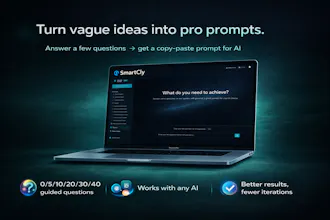
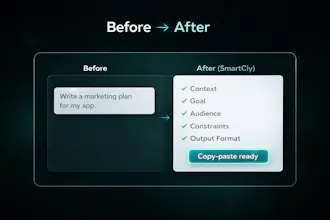
Turn vague ideas into consultant-grade prompts. You choose the depth—SmartCly asks a few fast, guided questions to capture missing context and lock in the outcome, then generates a structured, copy-paste prompt for any AI. Save templates, reuse your best workflows, cut retries, boost productivity, and get better outputs—faster.



Free
Launch Team / Built With


SpeedyIndex - Google indexing serviceGet backlinks indexed in Google, pay only for indexed URLs
Promoted
Congrats on the launch! This is super useful. I genuinely love the “consultant-grade prompt” approach because it solves the real problem: missing context, not “bad AI.” The depth control is a killer feature.
To answer your questions:
What I use AI for most: product specs & user stories, SOPs/process docs, meeting briefs, and client-facing proposals/emails. Anything where structure + clarity matters.
Speed vs precision: I’d use 0–10 for quick drafts and daily ops, and 20–30 when the output matters (client deliverables, specs, important decisions).
What would make it a daily tool: a few “one-click” templates by role (PM / Sales / Ops / Support), a simple team library to reuse/share prompts, and a way to save favorite settings (my default depth + tone + output format).
Two quick questions (simple ones 🙂):
Can I save my default depth (e.g., always start at 10 or 20)?
Do you plan to have a Chrome extension?
@waltermaker Thank you so much — really appreciate the detailed feedback 🙌 And you nailed it: it’s usually missing context, not “bad AI.”
On your questions:
1) Default depth / saved settings: Not yet, but it’s absolutely on our roadmap. We want you to be able to set a default starting depth (e.g., 10 or 20) and save preferences like tone + output format, so it feels instant for daily ops.
2) Chrome extension: Yes — it’s planned. The goal is to bring SmartCly into the places you already work (AI chats, docs, email) so you can run the guided flow without switching tabs.
Also +1 on your “daily tool” list: role-based one-click templates and a team/shared library are exactly the direction we’re heading.
Congrats Smartcly team for the lunch! 🚀 You can tell SmartCly is built by someone who actually uses AI for real work — the problem you’re solving (weak outputs because prompts miss context) is exactly what wastes the most time.
What I use AI for most: work + business. Mostly strategy docs, proposals, SOPs, product specs, quick research, and writing (emails/landing pages/short scripts).
Speed vs precision: for daily use I’d pick speed (0–10) for ~80% of cases (fast iteration), and precision (20–40) when it’s costly to be wrong: specs, launches, decisions, briefs for others.
A quick questions:
Are you planning to launch a Chrome extension?
@juan_gonzales12 Thanks a ton! 🙌 That’s exactly the split we designed for — speed for daily iteration, and precision when it’s expensive to be wrong (specs, launches, briefs).
On your question: yes, a Chrome extension is on our roadmap. The goal is to bring SmartCly into the places people already work (AI chat tools, docs, Notion, etc.) so you can run the guided flow without switching tabs. No ETA yet, but it’s one of the most-requested next steps.