
docs2excel.ai
Extract data from documents into Excel with AI – instantly
5 followers
Extract data from documents into Excel with AI – instantly
5 followers
docs2excel.ai uses AI to extract custom data points or full tables from documents and convert them into Excel. No complex setup required. Just upload your documents and download the results. ⚡️ Great for: 📄 Invoices, receipts, bank statements and POs. 👤 Resumes. 📚 Research papers. 🔒 Privacy first: Your files are processed only to deliver the service. They are never stored, sold, or used to train AI models.



Free Options
Launch Team

Klaussy ReviewTop Ranked AI Code Review Agent on ReviewBench
Promoted
👋 Hey Product Hunt!
I’m the maker behind docs2excel.ai, and I built this tool because I believe everyone deserves easy access to the productivity benefits that come with using AI. Most companies offer expensive, complex automations that require time-consuming integrations – an overhead that rarely justifies the ROI, especially for a small business. docs2excel.ai is the answer: an online tool that transforms messy files into structured, customizable Excel sheets in minutes. No setup, no code, no unnecessary complexity, and affordable.
🎯 THE STRUGGLE
We’ve all been there: You have a folder full of files like PDFs (invoices, POs, resumes, reports) and you need specific data points inside a spreadsheet: Open ➡️ Find ➡️ Copy ➡️ Paste ➡️ Repeat.
Multiply that by 100+ files? Hours of your life gone.
I wanted a tool where I could just dump my files and get a clean and consistent Excel sheet back – without setting up complex integrations. So I built it.
✨ HOW IT WORKS (3 Steps)
1. Upload files: We support PDFs, Word documents, images (PNG/JPEG/HEIC), and text files.
2. Define what you need: Tell the AI what columns you want (e.g., "Invoice Number," "Total Amount," "Candidate Name") or let it auto-detect them.
3. Get your Excel: Download a structured file where every document is a perfectly formatted row.
🚀 POPULAR USE CASES
- Finance: Batch processing invoices, bank statements, and purchase orders.
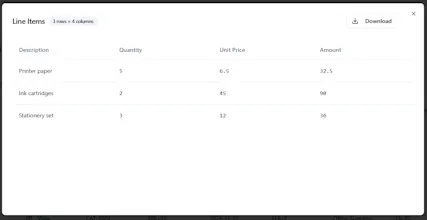
- Digitization: Extracting full tables from PDFs or scanned images.
- HR: Standardizing data from resumes/applications.
🔒 PRIVACY FIRST (We mean it)
- Your files are processed only to provide the service - never stored.
- We never use your data to train AI models.
- Files are wiped immediately after processing.
🎁 PRICING & DEMO
- Instant Demo: You can try the tool on our site without signing up to see the magic.
- Free pages: Available for everyone to try (no credit card required).
- Plans: Start at just $5/month.
🙏 YOUR FEEDBACK
I'd love your feedback!
What is the most annoying document type you process manually?
What features would you like to see next?
Let me know what you think!
Looks interesting. We've been manually copy-pasting data from vendor PDFs into our master sheets for months. If this actually handles multi-page tables without breaking the formatting, you'll save me about 10 hours a week. (so far
@amit_pelerman Thanks for the feedback! I’m happy to confirm that our model is designed to handle multi-page tables without breaking the formatting. We hope you make good use of those freed up hours!