Hello everyone! 👋 I'm Gwak, the developer behind Spacer, and I'm thrilled to introduce it to the Product Hunt community today!
🤔 Our Motivation: The Folder Dilemma I started building Spacer because I was constantly frustrated with traditional folder-based file explorers in certain situations. We create countless folders and rigid hierarchies just to classify files. When we need a file, we have to navigate through all those folders. For files saved long ago, the context is lost—you often have to open them just to remember what they were about. It's time-consuming and inefficient.
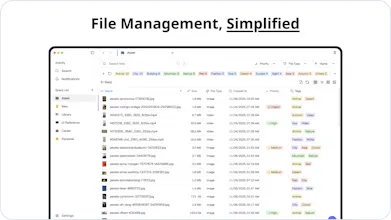
💡 Our Solution: Contextual File Management That’s why I created Spacer. It uses tags to let you quickly explore files based on their features, and allows you to save memos and status so you never lose context about what a file is for.
🚀 Core Features - 🏷️ Tag-Based Exploration: Freely classify and search files based on their characteristics, not rigid locations. - 📝 Memo & Status Management: Easily save context (notes, status, priority) so you know exactly what a file is without opening it. - ⚡ Fast, Combined Search: Find the file you need instantly by combining multiple tags.
🎯 Who is Spacer for? Spacer might not be the perfect solution for every situation, but I believe it will be an incredible help for: - Creatives who manage thousands of reference images and assets. - Researchers who organize papers, studies, and presentation decks. - Anyone who wants a more systematic, contextual way to manage their digital life.
I am committed to developing Spacer further and making it even better. Please share your thoughts and any feedback you have!
@mskyow There is no limit to the number of tags you can add to a file. However, the feature to assign categories to the tags themselves is not yet available.
A tag-based file explorer is such an underrated idea. Files rarely fit cleanly into folders anymore — tags make way more sense. The UI looks tidy too. Curious to see how it handles large libraries.
@kshitij_mishra4 Technically, we utilized web virtualization technology and image caching. Even when loading thousands of image files into a list, only the portion visible on screen is rendered, preventing performance degradation. Additionally, as a 100% local-first app, there is no API overhead.




Spacer
Hello everyone! 👋 I'm Gwak, the developer behind Spacer, and I'm thrilled to introduce it to the Product Hunt community today!
🤔 Our Motivation: The Folder Dilemma
I started building Spacer because I was constantly frustrated with traditional folder-based file explorers in certain situations.
We create countless folders and rigid hierarchies just to classify files. When we need a file, we have to navigate through all those folders. For files saved long ago, the context is lost—you often have to open them just to remember what they were about. It's time-consuming and inefficient.
💡 Our Solution: Contextual File Management
That’s why I created Spacer. It uses tags to let you quickly explore files based on their features, and allows you to save memos and status so you never lose context about what a file is for.
🚀 Core Features
- 🏷️ Tag-Based Exploration: Freely classify and search files based on their characteristics, not rigid locations.
- 📝 Memo & Status Management: Easily save context (notes, status, priority) so you know exactly what a file is without opening it.
- ⚡ Fast, Combined Search: Find the file you need instantly by combining multiple tags.
🎯 Who is Spacer for?
Spacer might not be the perfect solution for every situation, but I believe it will be an incredible help for:
- Creatives who manage thousands of reference images and assets.
- Researchers who organize papers, studies, and presentation decks.
- Anyone who wants a more systematic, contextual way to manage their digital life.
I am committed to developing Spacer further and making it even better. Please share your thoughts and any feedback you have!
Thank you for checking out our launch. 🙏
Swytchcode
This is a brilliant idea. Searching and identifying files with tags and notes will be pretty handy
Spacer
@chilarai Thank you for your interest!
Tags > folders for file organization? YES! Folders are so 1995.
Can you tag the same file multiple times with different categories?
Spacer
@mskyow There is no limit to the number of tags you can add to a file. However, the feature to assign categories to the tags themselves is not yet available.
Adjust Page Brightness - Smart Control
A tag-based file explorer is such an underrated idea. Files rarely fit cleanly into folders anymore — tags make way more sense. The UI looks tidy too. Curious to see how it handles large libraries.
Spacer
@kshitij_mishra4 Technically, we utilized web virtualization technology and image caching. Even when loading thousands of image files into a list, only the portion visible on screen is rendered, preventing performance degradation. Additionally, as a 100% local-first app, there is no API overhead.